How we made our API docs 15x faster with Kontent.ai
We rebuilt our API reference on Kontent.ai with one goal: performance on all fronts. The result is up to 15x faster page loads, unified search across our entire Learn portal, and the flexibility to iterate quickly on the developer experience.
Developers shouldn’t think about your documentation. They should just use it. When it’s fast, searchable, and easy to maintain, developers can focus on building. When it’s not, friction compounds with every visit.
Rebuilding our API reference gave us the opportunity to optimize for everyone who interacts with it—from developers reading the docs to our team maintaining them. By hosting everything on Kontent.ai, we gained performance improvements across three key areas: technical speed, content discoverability, and development velocity.
Speed that developers notice
The first thing developers notice is speed. Our API reference is now measurably faster across the board. We started tracking performance metrics last year to establish a baseline. Since then, we’ve achieved 15x faster sequential requests, 9x faster parallel requests, and near-instant page loads for most API reference pages thanks to background preloading.
Most of these gains came from implementing a more aggressive caching strategy and optimizing key parts of the codebase. We cache all content and expensive operations wherever possible, which significantly reduces runtime overhead. Our content architecture is intentionally dynamic, giving editors full control over how pages are structured. That flexibility introduces additional resolution complexity at runtime, so selecting the right data structures made a measurable difference. As Richard Sustek, our Lead Technical Architect at Kontent.ai, noted, “Replacing an Array with a Map for lookup-heavy operations resulted in immediate improvements. Developers often begin with the simplest structures, but as complexity grows, these decisions have a real impact.”
We also revisited how we use React. “When we first began building the Learn portal, my background was primarily in Angular, and some React concepts, especially around useEffect, were new to me,” Richard explains. A systematic review of our components helped us refactor to use effects only where appropriate, reducing unnecessary renders and improving overall responsiveness. Adopting Biome with strict linting and formatting rules surfaced potential issues early and encouraged more consistent patterns throughout the codebase. Finally, upgrading to the latest version of Next.js delivered its own performance enhancements.
All of this technical work translates to real-world impact. Faster documentation means developers spend less time waiting and more time building. When you’re constantly referencing endpoints, parameters, and response schemas, those seconds add up.
For API reference pages specifically, we rely on the automatic prefetching feature in Next.js. When a link appears in the user’s viewport, Next.js silently fetches the destination page in the background, often before the user decides to click. The result is near-instant navigation between pages, which feels particularly impactful when developers are navigating through documentation quickly.
Unified search and seamless integration
But speed is only part of the story. One of the biggest improvements is something that wasn’t architecturally possible before: unified search across the entire Learn portal, including API references.
Previously, our third-party platform limited control over URL structure, making it difficult to reliably map URLs back to their underlying content. Now that the entire API reference lives within Kontent.ai, we control the entire lifecycle: content modeling, rendering, and routing. With full control of every URL, extending our indexing pipeline to cover the API reference became straightforward. “Implementing unified search for API reference content took only a few hours because the foundational architecture was already prepared for this type of expansion,” Richard explained.
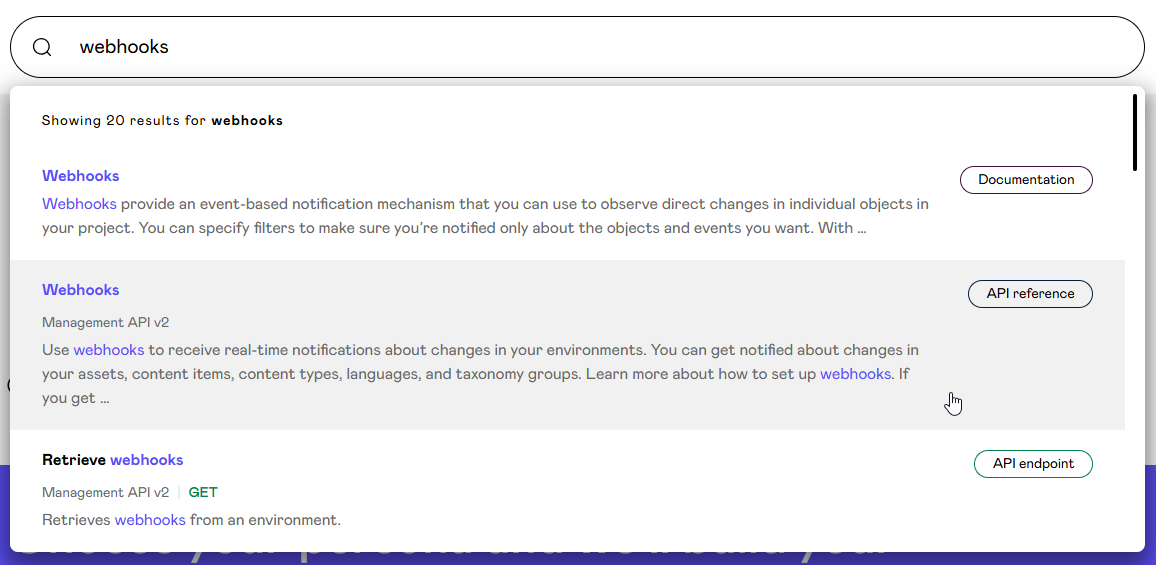
Searching for webhooks in the Kontent.ai Learn portal
Now, one search covers everything: documentation, learning paths, product updates, and API references. For example, if you’re looking for information about webhooks, you’ll find both the integration guide and the endpoint details in the same search results. This tight integration extends beyond search. The API reference shares the same navigation structure, design patterns, and user experience as the rest of the Learn portal. It’s all one cohesive system.
Building on our own platform
Hosting the API reference on Kontent.ai gives us complete control over how it looks and functions. No platform limitations, no waiting on third-party feature requests. This means we can iterate quickly on the developer experience.
The most challenging aspect of building this custom solution was determining how the existing content should translate into the final rendered experience. The API reference contains many nuances in how specific fields, schemas, and examples should appear. Previously, we converted our content into an OpenAPI specification and relied on our third-party platform to interpret and render everything. With our custom solution, we needed to design and implement the rendering logic ourselves and consider every edge case.
The shift from OpenAPI conversion to working directly with Kontent.ai content items turned out to be a significant improvement. Strongly typed models generated with @kontent-ai/model-generator were especially valuable, providing type-safe access to every element and making the development workflow much smoother.
This rebuild also prompted a broader simplification of our codebase. We removed external dependencies in favor of native capabilities or small utilities, reducing bundle size and improving predictability. We adopted more functional programming patterns, which helped us produce cleaner, more expressive code that’s easier to reason about and maintain.
Working on this project reinforced how well Kontent.ai supports the creation of structured technical documentation at scale. Modeling complex content (endpoints, schemas, examples, and nested references) was straightforward, and the platform gave us the flexibility to design the architecture exactly the way we needed. “Having every element, taxonomy term, and option fully typed in TypeScript drastically reduced errors and sped up development,” Richard noted. “It also made iterating on the content model much safer and more predictable.”
What’s next
The new API reference is live now at https://kontent.ai/learn/docs/apis. We’d love to hear what you think, whether you notice the performance improvements or have suggestions for what could be better.
“Software is always evolving, and this release is another step forward rather than the final destination,” Richard reflected. “We’re committed to continually improving the developer experience, and user feedback helps us prioritize what matters most.”
What if we told you there was a way to make your website a place that will always be relevant, no matter the season or the year? Two words—evergreen content. What does evergreen mean in marketing, and how do you make evergreen content? Let’s dive into it.
How can you create a cohesive experience for customers no matter what channel they’re on or what device they’re using? The answer is going omnichannel.
To structure a blog post, start with a strong headline, write a clear introduction, and break content into short paragraphs. Use descriptive subheadings, add visuals, and format for easy scanning. Don’t forget about linking and filling out the metadata. Want to go into more detail? Dive into this blog.
Lucie Simonova
Subscribe to the Kontent.ai newsletter
Get the hottest updates while they’re fresh! For more industry insights, follow our LinkedIn profile.