How Kontent.ai Builds AI Agent Governance into Every Step
AI agents are only as useful as the output you can trust. See how Kontent.ai scopes their permissions, routes their work through your workflows, and logs every change for easy rollback.
HBO Max once sent subscribers an email titled "Integration Test Email #1." Samsung has listed phones on its own websites before announcing them. And in October 2026, Just Eat's AI turned a Belfast cafe's soda bread into a glass of cola.
One was a test that escaped, one was a launch that leaked, and one was AI taking things, well, a bit too literally. The gap was the same each time: content reached the public before the right people checked it.
AI agents widen that gap when nobody keeps them in check. Agents work in bulk and in the background, so one unclear instruction reaches far more content than any single editor touches, and every change still goes out under your company's name. Before digital leaders put agents into production, they need answers to four questions: what can an agent change, who approves its work, how far can a mistake spread, and how do you find out what happened?
AI agent governance answers them. It's the set of rules, controls, and guardrails that keep people in control and AI accountable. This article, one part of a wider series on content governance, covers how Kontent.ai, the world's first Agentic CMS, builds those controls into its platform.
Agents follow the rules your content already follows
There's no separate rulebook for AI. Agents work inside the same content model, permissions, and workflows as your team, so the governance you've set up for people applies to agents from their first run.
Content model rules. Required fields, character limits, and validation apply to every content item, whoever or whatever wrote it.
Roles and permissions. Roles set what people can view, edit, create, and delete, by content type, brand, region, and language. Aiko inherits them.
Workflows. Every change moves through the approval steps you define.
Identity. Sign-in runs through your own identity provider, with multifactor authentication required across your company domain on Enterprise and Flex plans.
Security and data. Customer content isn't used to train AI models, and the Trust Center lists the security and AI governance standards behind the platform, including ISO/IEC 42001 and the NIST AI RMF.
That shared foundation means one set of rules to manage, not one for people and another for machines. The five pillars below build on it.
Scoped permissions
An agent that fills in SEO metadata has no business deleting a product line or changing your content model. Each agent gets only the access its job needs, and ownership of agents stays with the people accountable for the project.
Scroll horizontally to see more →
Aiko
Expert Agents
What it does
Carries out content tasks a person asks for in conversation
Runs a defined task automatically in the background
Who controls it
Roles you grant the Access Aiko Agent permission; new roles don't get it by default
Project managers create and manage every agent
What it's allowed to do
Only what the person asking is allowed to do. If they can't publish, Aiko can't either
Only the permissions you assign: read, update, create, or delete content items, and read or update assets
When it acts
When someone asks
When content reaches a workflow step you choose, or a new language variant is created
How its changes appear
"[Name] via Aiko"
Under the agent's own name
Two more boundaries matter once agents reach beyond the CMS:
External AI tools get scoped access too. Agents and AI tools outside the CMS connect through the MCP server with an API key, and they get only that key's permissions.
Project managers decide what Aiko can reach. Web access and connectors to tools such as Asana, Atlassian, and Notion are switched on per environment, and each teammate connects their own account.
Human in the loop
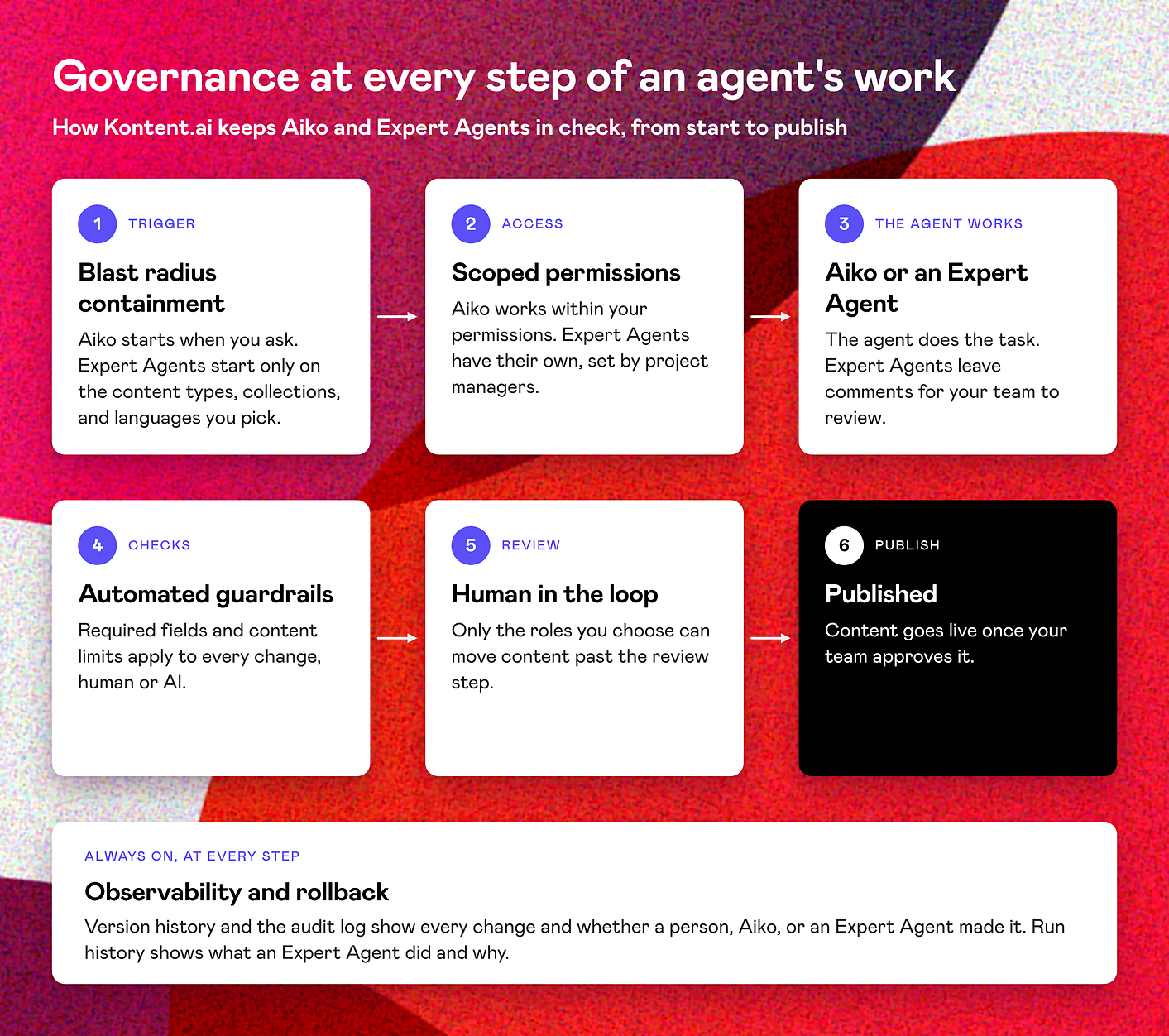
Agents move fast, but what reaches customers still depends on a person's sign-off. That sign-off lives in the workflow, where it can't be forgotten.
Agents work inside your workflows. Each workflow step lists the steps it can move to, so a draft can't jump straight to published, whether a person or an agent wrote it. Only the roles assigned to a step can move content past it.
You decide where agents run. Trigger an Expert Agent when content reaches a specific step, such as filling in SEO metadata just before marketing review, so a person checks the result next.
You decide what an agent can push forward. Permission to update content lets an Expert Agent move items through workflow steps, including publishing. Pair it with a trigger before your review step, and a person approves the work before customers see it.
Reviewers see only what changed. After a bulk update, Aiko lists each item it touched with only the modified elements highlighted. Reviewers check the changes instead of rereading whole pages, which keeps high-volume approvals from turning into a rubber stamp.
Agents leave comments for your team. Expert Agents can add comments to content for people to review, so an agent can flag an issue and a person decides what to do about it.
Higher-risk content takes a stricter route. Separate workflows by content type and by brand or region send a regulated product page through legal review while a social post takes the short path.
Automated guardrails
Review works best when the obvious problems never reach the reviewer. Agent output is checked against your rules before it can move forward.
Validation applies to agents too. Required fields, word and character limits, allowed formatting, and regular expressions block publishing until content meets them. Aiko can't publish an item while a required field is empty. A required field doesn't care who forgot it, a person or an agent.
Guidelines travel with the content. Content type and field guidelines tell writers and Aiko what good looks like, from voice and tone to what a product description must include. Only people with access to your project see them.
Compliance checks run as agents. An Expert Agent checks content against your brand or compliance guidelines when it reaches a workflow step you choose. For checks that gate publishing, the Thorough setting has the agent work through more detail on each run.
Guidelines don't teach an AI what soda bread is. They do put your terms, standards, and examples in front of every agent and every reviewer, so the person approving a change has what they need to catch the mistake.
Example: green claims under EU law. Since September 27, 2026, the EU's EmpCo Directive has banned generic environmental claims, such as "eco-friendly," that aren't backed by proof. A required evidence field, guidelines on approved wording, and a legal review step keep each claim tied to its proof before it reaches customers. Our guide to the EmpCo Directive and green claims walks through the full workflow.
Blast radius containment
When an agent misreads an instruction, what matters is how far the mistake spreads. Each agent's reach stays narrow, and you have ways to stop it.
Narrow triggers. Each Expert Agent runs only on the events you choose, a new language variant or a move to a specific workflow step, and only for the content types, collections, and languages you select.
Start small, then widen. Test an agent's instructions on a few items before turning on automation at scale, then widen its scope as its results hold up in the run history.
Stop what's running. A background Aiko operation can be stopped mid-run. Remaining changes don't go through, and the ones already made stay in version history, where they can be reviewed and restored.
Switch agents off without losing them. Deactivating Expert Agents doesn't delete them or their setup, so they come back exactly as they were.
Observability and rollback
If you can't see what an agent changed, you can't trust what it changes next. Agent activity is recorded at three levels, and you can undo any of it.
Every agent run. Expert Agent run history shows each recent run, the item it acted on, its status, and a summary of what the agent did and why. Because agents only run on events you define, the trigger behind every change is known.
Every content item. Version history saves each Aiko change as "[name] via Aiko" and each Expert Agent change under the agent's name, as its own version, kept separate from human edits. Compare versions highlights what changed, selecting several versions shows the changes across all of them, and hovering over a change shows who made it.
The whole environment. The audit log keeps 90 days of changes to content items, language variants, taxonomies, content types, and more, including deletions. Filter it by actor type (user, Aiko, Expert Agent, integration, or system) to separate agent activity from human activity.
Rollback. Restore any earlier version of a content item, and the change is undone.
What "agents can't go rogue" means in practice
Agents only get the permissions you give them.
Agents work inside your workflow, and you decide how far their work can move.
Every agent change is labeled, logged, and reversible.
Control stays with your people
Kontent.ai provides the controls and the record. Your team reviews, approves, and fact-checks what agents produce, and decides what reaches customers. That division is written into how responsibility is shared between us and our customers, and it's why agents can take on more of the repetitive work without taking over the decisions.
No platform rules out every slip. HBO Max's test email, Samsung's early listings, and Just Eat's glass of cola all came down to one question: did the right person see this before customers did? The platform puts that checkpoint inside the workflow, for every person and every agent, where it doesn't depend on anyone's memory.