How to Build a Connected, Composable Content Ecosystem Without Replacing Your Tech Stack
Build a connected, composable content ecosystem without replacing your tech stack. Learn how to unify best-of-breed tools, automate workflows, and empower your team with Kontent.ai.
Your content stack probably wasn’t designed all at once. You added the CMS, DAM, project management, translation, analytics, search, and other tools your teams needed, one at a time.
Now they all need to work together.
Content gets copied between systems. Teams jump between tools for context. Updates get missed. And every new tool creates another connection to figure out.
Your people become the integration layer.
Replacing everything with a new platform isn’t much of a solution. It means migration, retraining, and months of implementation.
A connected, composable content ecosystem takes a different approach: keep the tools that work and connect the work between them.
That’s the promise of composable architecture: choose the technologies that solve each problem best, then connect them into an ecosystem that can evolve as your business does. Best-of-breed doesn’t have to mean disconnected.
What is a connected content ecosystem?
A unified content ecosystem connects the tools, systems, and workflows involved in creating, managing, and delivering content; without requiring them to become one monolithic platform.
Instead of treating your CMS, DAM, project management platform, analytics tools, and other technologies as separate destinations, you connect them so information and actions can move between them.
At the architectural level, this is what composability makes possible. Instead of relying on one suite to do everything, a composable stack combines specialized technologies through APIs, integrations, and open standards. Each system can continue doing what it does best while contributing to a connected content operation.
The result is a content operation where teams can work with the tools they already rely on while spending less time moving information from one system to another.
For enterprise teams, that matters. You’ve invested in your existing stack because those tools solve specific problems well. A composable ecosystem lets you build on that investment rather than starting over and gives you more freedom to add, replace, or evolve individual capabilities as your requirements change.
The goal isn’t to force every capability into fewer tools. It’s to get more value from the right tools by making them work together.
3 benefits of a connected, composable content ecosystem
1. Keep your best-of-breed tools
You shouldn’t have to compromise on the tools your teams use just to create a connected content operation.
Your DAM can remain your DAM. Your project management platform can remain your project management platform. Your search and analytics tools can continue doing what they do best.
The key is connecting them to the content workflows that depend on them.
That’s the core idea behind a best-of-breed, composable approach: use specialized technology where it creates the most value, without accepting disconnected workflows as the price of that choice.
Kontent.ai supports ready-built integrations with technologies across search, ecommerce, personalization, translation, and more. Its API-first architecture also makes it possible to connect custom systems and services. Custom apps can bring external services, dashboards, and specialized tools directly into the CMS.
That means you can build an ecosystem around the tools that already fit your business instead of forcing every team onto one platform. Within that ecosystem, Kontent.ai provides the structured, governed content layer that connects content with the specialist technologies involved in creating, enriching, managing, and delivering it.
And because those capabilities remain composable, changing one part of your technology strategy doesn’t have to mean replacing the whole stack. You can introduce new channels, services, or specialist tools while protecting the investments and processes that still work.
Kontent.ai was also recently recognized by G2 for Easiest Setup in both WebOps and DXP, providing third-party validation of the platform’s ease of getting up and running.
But connecting your stack is only the starting point.
2. Bring the right context into the content workflow
Connecting systems is useful. Making the information inside those systems available when your team needs it is even more useful.
Think about everything that can sit outside your CMS:
A campaign brief in a project management platform (e.g. Asana)
Brand guidelines in a knowledge management platform (e.g. Confluence)
SEO research in an optimization platform (e.g. Google Search Console)
Product information in a PIM (e.g. Akeneo)
Approved images in a DAM (e.g. Bynder)
Technical details in a developer or documentation platform (e.g. GitHub)
Customer feedback in a CRM (e.g. Salesforce)
Your team can open each system, find the information, copy what they need, and bring it back to the CMS.
Or you can connect those sources directly to the content workflow.
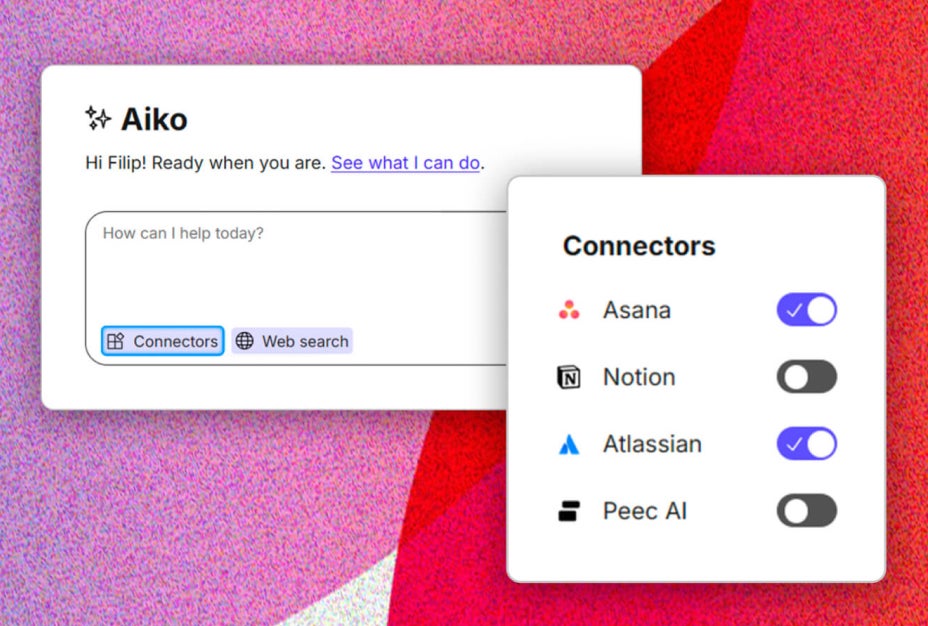
MCP is an open standard that allows AI agents and software tools to exchange information and actions. In Kontent.ai, Aiko can use MCP connectors to access external tools and services on a user’s behalf, bringing relevant context and actions into the CMS conversation.
For example, instead of opening Asana to find the requirements for a new page, a content team could ask our general AI agent Aiko to pull the relevant brief into the workflow. Aiko can also access information from connected tools such as Confluence, Notion, or search platforms.
The work stays connected to the systems where the information already lives.
That’s an important distinction. You don’t need to move everything into your CMS. You need to make the right information available where the work happens.
This is where a composable ecosystem starts to become more than a collection of connected technologies. The architecture remains distributed and best-of-breed, but the experience becomes more coordinated because the context required to do the work can move across system boundaries.
3. Move from connected systems to orchestrated work
Composable architecture connects the systems. Agentic capabilities can take the next step by helping coordinate and automate the work that happens across your content operation.
Consider what happens every time a new piece of content is created. Someone may need to translate it, add metadata, check it against brand guidelines, optimize it for search, or prepare it for another channel.
Those tasks may each be small. Across thousands of content items, they add up quickly.
Expert Agents automate recurring content tasks based on instructions you define. They can trigger when content changes and handle jobs such as translation, SEO and GEO metadata, compliance checks, and content enrichment.
Multiple agents can work on different tasks at the same time, allowing routine work to happen in the background while your team focuses on decisions that require human judgment.
Across customers, an agentic CMS can save teams an average of 15,000 hours per year by automating content work and reducing manual effort.
You don’t need to connect everything at once. Start with the parts of your content operation where disconnected tools create the most work.
1. Map where content moves
Start with the journey a piece of content takes from brief to publication.
Where does the work begin? Which systems hold the information your team needs? Where are people copying and pasting? Which handoffs require someone to check, update, or move information manually?
These are your opportunities for connection and automation.
2. Prioritize the connections that matter
You don’t need an integration for every tool in your stack.
Start with the connections that remove the most manual work or give your teams access to information they regularly need.
For example, connecting your CMS to a translation platform could simplify localization. Connecting it to your DAM could make approved assets easier to find. Connecting project management tools could bring briefs and deadlines into the content workflow.
Build from there.
3. Connect external context without rebuilding your architecture
Traditional integrations are still valuable for systems that need a direct, reliable connection.
MCP connectors add another layer by allowing AI agents to interact with external tools and retrieve the context needed to complete a task.
Instead of building a custom workflow every time your team needs information from another system, you can give Aiko access to the tools your teams already use.
The underlying CMS architecture stays the same. Your content models, APIs, and delivery infrastructure don’t need to be rebuilt.
That gives you another way to extend what your ecosystem can do without turning every new requirement into another replatforming or custom integration project.
4. Automate repeatable work
Once the connections are in place, look for tasks that follow predictable rules.
Translation. Metadata. Governance checks. Content enrichment. Updates across variants.
These are strong candidates for Expert Agents because they don’t require your team to make the same decision manually every time.
The goal is to let automation handle the operational work while people focus on strategy, creativity, and the decisions that need human judgment.
5. Keep governance as the ecosystem scales
Connecting more systems and automating more work shouldn’t mean giving up enterprise control. As your ecosystem grows, define who can access information, who can initiate actions, where approvals are required, and how activity is governed and traced.
That becomes especially important as AI moves from assisting individual users to executing work. In Kontent.ai, agentic capabilities operate within existing permissions and governance controls, helping organizations increase automation without creating a separate, ungoverned operating layer.
What a connected content ecosystem looks like
Imagine a campaign starting with a brief in your project management platform.
The content team brings the requirements into Kontent.ai. Aiko can access relevant brand guidance from your documentation and use search data to inform the work. Approved assets can come from your DAM. Once the content is ready, Expert Agents can handle metadata, governance checks, and translations.
Each tool continues doing the job it was chosen for.
The difference is that your team doesn’t have to act as the messenger between them.
That’s the real value of a connected, composable content ecosystem: the tools stay specialized, while the workflow becomes connected.
You keep the freedom of best-of-breed architecture without making your teams absorb the operational cost of disconnected systems. The architecture stays composable. The content operation feels connected.
Want to see connected content ops in action?
Connecting systems, automating workflows, and introducing AI across your tech stack shouldn’t add complexity to your operations.
In our session Content Ops Without the Complexity: Connect, Automate, and Govern at Scale, Martin Michalik (Chief Product & Technology Officer) and Diana Stanovcakova (Product Marketing Manager) break down how to unify your ecosystem while maintaining strict governance and control.
What you'll learn:
Maximize your tech stack: Connect best-of-breed tools without forcing teams onto a single monolithic platform.
Coordinate work across systems: How AI agents retrieve context and execute tasks across your tech stack.
Maintain enterprise governance: Track changes, establish clear oversight, and govern AI-assisted workflows at scale.
Live Product Walkthrough: A hands-on demo showcasing real-world connected content workflows.
Enterprise content operations will keep adding tools, channels, data sources, and AI capabilities. Your stack needs to evolve with them.
A connected ecosystem gives you room to add new capabilities without rebuilding everything around them.
APIs connect your technology. Integrations connect your systems. MCP connectors give AI agents access to external context and actions. Expert Agents automate repeatable work across your content operation.
Together, they create a content ecosystem that can keep up as your technology stack evolves.
You don’t have to rip out the tools you’ve already invested in. You can connect them, build on them, and add new capabilities as your needs change.
Keep the tools that work. Connect the work between them.
Explore what a connected, composable content ecosystem would look like for your business with Kontent.ai. [See if we’re a fit]
Table of contents
What is a connected content ecosystem?
3 benefits of a connected, composable content ecosystem
What if we told you there was a way to make your website a place that will always be relevant, no matter the season or the year? Two words—evergreen content. What does evergreen mean in marketing, and how do you make evergreen content? Let’s dive into it.
How can you create a cohesive experience for customers no matter what channel they’re on or what device they’re using? The answer is going omnichannel.
To structure a blog post, start with a strong headline, write a clear introduction, and break content into short paragraphs. Use descriptive subheadings, add visuals, and format for easy scanning. Don’t forget about linking and filling out the metadata. Want to go into more detail? Dive into this blog.
Lucie Simonova
Subscribe to the Kontent.ai newsletter
Get the hottest updates while they’re fresh! For more industry insights, follow our LinkedIn profile.