Despite growing awareness, most digital experiences still fall short on accessibility, but emerging AI technologies are transforming how we fix and even prevent these barriers at scale.
Web accessibility remains one of the most overlooked aspects of digital design, despite its critical importance. The WebAIM Million study reveals that nearly 95% of websites have detectable accessibility failures, creating barriers for millions of users worldwide. But the good news is that artificial intelligence is revolutionizing how we approach website accessibility, making it easier than ever to create inclusive digital experiences.
In this comprehensive guide, we’ll explore how AI-powered tools can help you build accessible websites and ensure your content reaches every user regardless of their abilities.
What is web accessibility and why it matters
Web accessibility means designing digital experiences that everyone can use, regardless of their physical or cognitive abilities. This includes people with visual, auditory, motor, or cognitive disabilities who may rely on assistive technologies like screen readers, keyboard navigation, or voice commands to access online content.
The Web Content Accessibility Guidelines (WCAG), developed by the World Wide Web Consortium (W3C), provide the global standard for accessibility. These guidelines organize accessibility requirements into three conformance levels: A (minimum), AA (mid-range), and AAA (highest). Most organizations aim for WCAG 2.1 Level AA compliance, which addresses the most common accessibility barriers.
Examples of color combinations tested for WCAG AAA compliance, showing one passing and two failing contrast ratios.
Common accessibility challenges include images without alternative text, poor color contrast that makes text difficult to read, videos lacking captions, forms that can’t be navigated with a keyboard, and complex navigation structures that confuse screen reader users. Each of these barriers can prevent users from accessing your content, completing purchases, or engaging with your services.
Legal requirements around accessibility continue to expand globally. In the United States, the Americans with Disabilities Act (ADA) applies to websites, with courts consistently ruling that digital properties must be accessible. Federal courts saw over 3,200 website accessibility lawsuits in 2022 alone. Section 508 requires federal agencies and their contractors to make electronic content accessible. The European Union’s Web Accessibility Directive mandates accessibility for public sector websites and mobile applications, while the upcoming European Accessibility Act will extend requirements to private sector businesses. Similar laws exist in Canada, Australia, and numerous other countries.
Beyond compliance, accessibility delivers compelling business benefits. The World Health Organization estimates that 16% of the global population experiences significant disabilities, representing a massive market opportunity. Accessible websites also tend to rank better in search results, as many accessibility best practices align with SEO fundamentals. Perhaps most importantly, accessibility improvements benefit everyone. Captions help users in noisy environments, clear navigation assists users in a hurry, and good color contrast reduces eye strain for all visitors.
Content accessibility guide: Importance, best practices, and practical tips
What is content accessibility, why does it matter so much, and what can you do to make sure you’re creating an inclusive digital space for everyone? Let’s find out.
The role of AI in website accessibility
Traditional approaches to accessibility testing have significant limitations. Manual audits are time-consuming, expensive, and difficult to scale across large websites. Even experienced accessibility experts can miss issues, especially when dealing with complex interactions or dynamic content. Moreover, manual testing often happens too late in the development process, making fixes more costly and disruptive.
This is where AI steps in. It can analyze websites at scale, identifying patterns and potential barriers that would take human auditors weeks or months to discover. AI systems can continuously monitor websites for accessibility issues, catching problems immediately after they’re introduced rather than during periodic audits. Most importantly, AI can identify issues as well as automatically generate solutions, from creating image descriptions to suggesting color palette improvements.
Key AI capabilities for accessibility
Modern AI offers powerful capabilities that help make things more accessible. Computer vision models can analyze images and generate descriptive alternative text that conveys the content and context to screen reader users. These same models can evaluate color contrast ratios across entire websites, flagging combinations that don’t meet WCAG requirements and suggesting accessible alternatives.
Natural language processing enables AI to assess content structure, ensuring proper heading hierarchies and logical reading order. Machine learning algorithms can predict how screen readers will interpret page layouts, identifying potential confusion before real users encounter it. Voice recognition and transcription services automatically generate captions and transcripts for video and audio content.
AI systems can also simulate different user interactions, testing keyboard navigation patterns and identifying elements that can’t be reached without a mouse. Some advanced tools even predict which accessibility issues are most likely to impact real users based on patterns across millions of websites.
Best AI-powered accessibility tools
There are now many more accessibility tools than ever before, and understanding which tools excel at different tasks helps you build an effective accessibility toolkit.
Automated testing and scanning tools
Lighthouse, built into Chrome DevTools, provides automated accessibility audits alongside performance and SEO checks. Its machine learning models have been trained on thousands of websites, enabling it to detect subtle issues and provide prioritized recommendations. The tool generates actionable reports that development teams can immediately act upon.
“Why is my Lighthouse Score low?”
Dive into this article written by an experienced web developer to learn what affects your Lighthouse score.
Accessibility Insights from Microsoft combines automated checks with guided manual testing. Its AI components help identify issues that require human judgment, providing clear instructions for testing interactive elements, keyboard navigation, and screen reader compatibility.
Axe DevTools by Deque Systems remains the gold standard for developers. This browser extension and command-line tool uses AI-enhanced detection to identify WCAG violations directly in your development environment. It integrates seamlessly with popular frameworks and CI/CD pipelines, catching issues before code reaches production. The tool excels at detecting complex issues.
WAVE (Web Accessibility Evaluation Tool) by WebAIM offers a visual representation of accessibility issues directly on your webpage. Its AI-powered analysis highlights problems with color coding while showing the structure of your page from an accessibility perspective. The tool is particularly valuable for content creators who may not have technical backgrounds, as it explains issues in plain language.
AI-powered content enhancement tools
Creating accessible content becomes dramatically easier with AI-powered enhancement tools. Image description generators use computer vision to analyze photos, illustrations, and graphics, producing descriptive alternative text that captures both content and context.
Tools like ahrefs.com/writing-tools/img-alt-text-generator help write optimized alt text for your images.
Video captioning services leverage speech recognition AI to automatically transcribe audio, generating accurate captions with proper timing. Advanced systems can identify multiple speakers, handle technical terminology, and even detect relevant sound effects. Services like Otter.ai, Descript, and YouTube’s automatic captioning continue to improve their accuracy through machine learning.
Tools like Otter.ai allow you to quickly generate transcripts and extract key information from audio.
Reading level analyzers use natural language processing to assess content complexity, helping ensure your writing is understandable to the widest possible audience. These tools evaluate sentence structure, vocabulary difficulty, and overall readability, suggesting simplifications where appropriate.
Content management systems with built-in AI accessibility
Modern content management systems are integrating AI-powered accessibility features directly into the authoring experience, making it easier to create accessible content from the start rather than retrofitting it later.
Kontent.ai stands out with its comprehensive AI-accelerated approach to accessible content management. The platform uses AI to classify images in asset libraries according to their contents and generates image descriptions in multiple languages, helping content teams enhance accessibility while improving SEO rankings simultaneously.
You can generate alt text for each image with just one click in Kontent.ai.
What makes Kontent.ai particularly powerful for accessibility is its structured content approach. Instead of treating accessibility as an afterthought or a last-minute audit task, Kontent.ai enables teams to bake accessibility requirements directly into their content models. With configurable content types, teams can enforce accessibility-critical elements—such as transcripts or compliance-specific metadata—as mandatory inputs during content creation.
The platform’s headless architecture separates content from presentation, which proves invaluable for accessibility. Content stored in structured, presentation-independent formats becomes inherently more adaptable to various assistive technologies. Product descriptions stored as separate elements rather than formatted HTML blocks can be rendered appropriately for screen readers, voice interfaces, or any other accessibility tool.
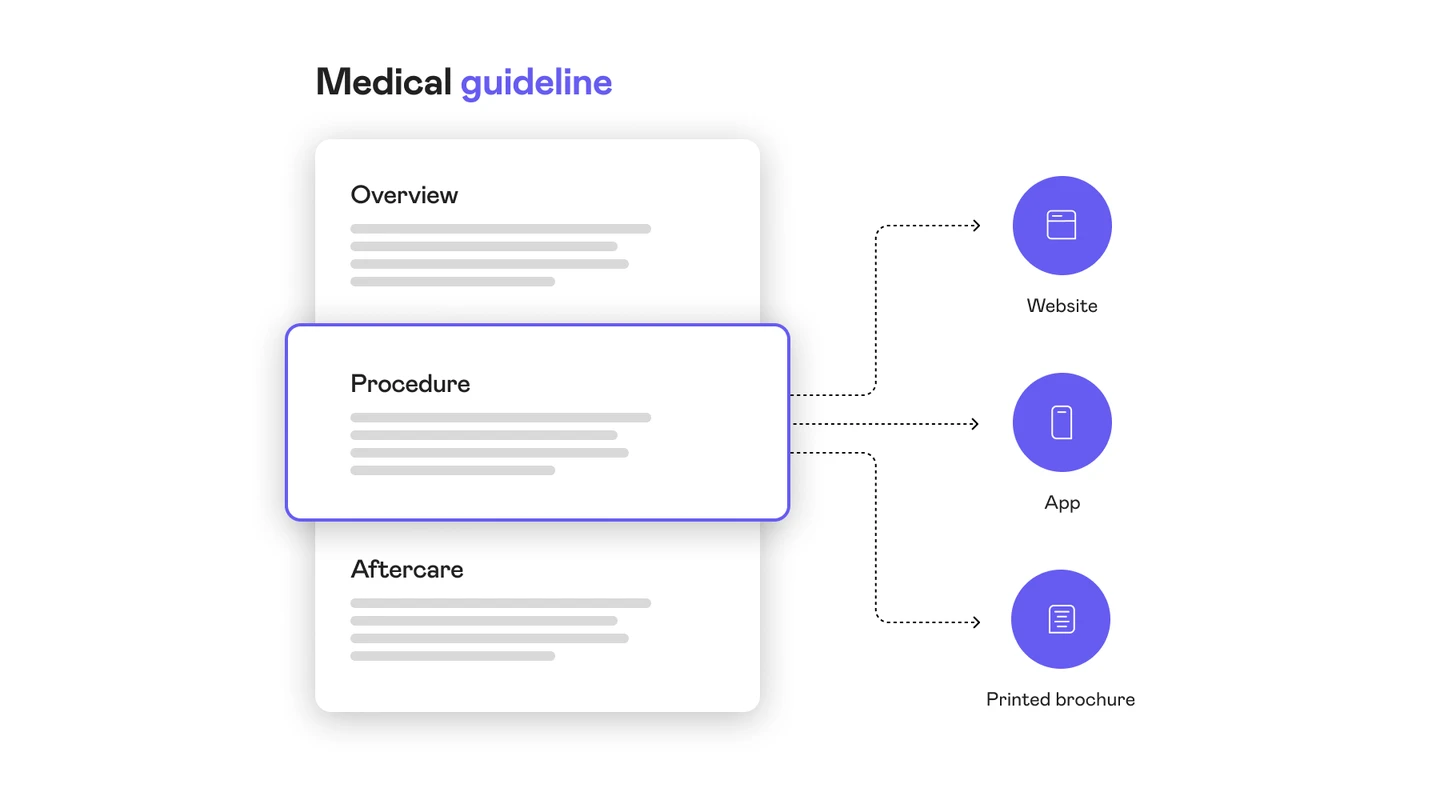
Thanks to the structured approach, individual elements can be reused across many formats.
Kontent.ai’s AI capabilities extend throughout the content lifecycle. The platform’s smart asset management uses AI image recognition to make assets easily searchable using natural language, eliminating the need to memorize file names or navigate complex structures. When managing large asset libraries, AI automatically categorizes and describes images, ensuring accessibility metadata is present from the moment assets enter the system.
Now, AI Agent takes all this even further by enabling you to work with your content using natural language. AI Agent autonomously performs complex operations—from auditing outdated items and fixing accessibility gaps to generating new content, applying bulk updates, translating items, and aligning everything with brand and compliance standards. It helps teams optimize content faster, at scale, and with complete control across workflows and permissions.
AI Agent can carry out complex tasks.
Real-world success stories demonstrate Kontent.ai’s accessibility impact. VU Amsterdam implemented the platform to ensure all university content meets accessibility standards. The headless approach allows their User Experience team to implement necessary front-end components to make all content accessible to all visitors, without additional steps required on the authoring side. Content creators focus on producing quality information while accessibility compliance is enforced through the platform’s structure and AI capabilities.
VU Amsterdam’s content is now more accurate as well, due to the ability to reuse content and archive items once they’re no longer relevant.
Real-time accessibility widgets
Accessibility overlay widgets represent a controversial category of AI-powered tools. These services, including offerings from AccessiBe, UserWay, and AudioEye, add JavaScript to websites that promises to make them accessible instantly. These widgets typically offer features like text resizing, contrast adjustment, cursor highlighting, and AI-powered content remediation.
Tools like accessiBe allow you to quickly make your website more accessible by using AI-driven technology to detect issues.
The controversy stems from significant limitations. Overlay widgets cannot fix underlying structural issues with website code. They may interfere with assistive technologies that users already rely on. The accessibility community has raised serious concerns about these tools, with many disabled users reporting that overlays create more problems than they solve.
However, overlays can serve as temporary measures while working toward comprehensive accessibility improvements. They may help with quick adjustments for users who need them, like increasing text size or adjusting contrast. The key is viewing them as supplements to proper accessibility implementation, never as replacements for well-structured, natively accessible code.
Step-by-step guide to using AI for accessibility
Implementing AI-powered accessibility requires a systematic approach. Here’s how to leverage these tools effectively throughout your accessibility journey.
Step 1: Audit your current site
Begin by understanding your starting point. Run comprehensive automated scans using tools like Axe DevTools, WAVE, and Lighthouse. These tools will generate reports identifying WCAG violations, categorized by severity and impact. Focus first on critical issues that completely block access for some users, such as insufficient color contrast or keyboard navigation failures.
Document your findings in a centralized location, organizing issues by page template or component rather than individual pages. This approach helps you identify systemic problems that affect multiple areas of your site. If you have hundreds or thousands of pages, prioritize based on traffic and conversion importance. Your homepage, key landing pages, and checkout flows should be addressed first.
Consider your website’s technology stack when planning fixes. Content management systems, JavaScript frameworks, and third-party integrations each present different accessibility challenges and opportunities for AI-assisted solutions.
Step 2: Automate low-hanging fruit
Tackle issues that AI can address immediately. Start with image alternative text. If you have hundreds or thousands of images without descriptions, AI-powered generators can create baseline alt text that you can refine over time. While AI-generated descriptions may not be perfect, they’re dramatically better than missing alt text.
Address color contrast issues systematically. AI tools can scan your entire site, identify problematic color combinations, and suggest accessible alternatives that maintain your brand aesthetics. Many tools integrate directly with design systems, allowing you to fix contrast issues across all instances simultaneously.
Fix heading hierarchy problems using AI-powered structure analysis. These tools identify pages where headings skip levels or don’t follow logical order, providing clear remediation steps. Proper heading structure is crucial for screen reader navigation and is relatively straightforward to fix once identified.
Implement automated form validation checks. AI tools can ensure form fields have proper labels, error messages are clear and programmatically associated with fields, and required fields are clearly marked. These improvements benefit all users while ensuring keyboard and screen reader users can complete forms successfully.
Step 3: Integrate AI tools into your workflow
The most successful accessibility programs integrate testing into existing development workflows rather than treating it as a separate activity. Add accessibility checks to your continuous integration and continuous deployment pipelines. Configure automated tests to run every time code is pushed, catching new issues immediately.
Set up accessibility monitoring that scans your production site regularly. These systems alert you when new accessibility issues appear, whether from content updates, design changes, or third-party script modifications. Continuous monitoring prevents accessibility regression, where previously accessible features become inaccessible through subsequent updates.
Create accessibility dashboards that track metrics over time. Monitor the number and severity of issues, time to resolution, and compliance scores across different site areas. These dashboards provide visibility into accessibility health and help justify ongoing investment in accessibility improvements.
Integrate AI accessibility tools into content creation workflows. Set up workflows that route content through accessibility reviews, using AI to pre-screen for common issues before human reviewers examine it.
Train your team to use AI tools as part of their regular work. Developers should run accessibility checks before submitting code reviews. Designers should verify color contrast and touch target sizes during the design phase. Content creators should use AI-assisted tools to write image descriptions and ensure proper heading structure.
Step 4: Validate with human testing
AI dramatically improves accessibility testing efficiency, but it cannot replace human judgment and real-world testing. Automated tools typically catch only 30-40% of accessibility issues. The remaining problems require human evaluation, particularly for complex interactions, content comprehension, and subjective assessments of user experience.
Conduct manual testing following the WCAG methodology. This includes keyboard-only navigation testing, screen reader testing with tools like NVDA, JAWS, or VoiceOver, and evaluation of cognitive load and content clarity. Test on actual devices and assistive technologies that your users rely on, as behavior can differ significantly from simulation tools.
Most importantly, involve people with disabilities in your testing process. User research with disabled participants provides insights that no automated tool or non-disabled tester can replicate. These sessions reveal real-world usability issues, workarounds that users have developed, and opportunities to exceed basic compliance and create genuinely excellent experiences.
Establish a feedback mechanism where users can report accessibility barriers they encounter. Monitor this feedback alongside automated testing results to identify gaps in your AI-powered accessibility program.
AI accessibility best practices
Success with AI-powered accessibility requires following proven practices while avoiding common pitfalls.
Use AI as a complement, not a replacement. AI tools excel at scale, speed, and consistency, but they lack the contextual understanding and nuanced judgment that humans bring. Use AI to handle repetitive tasks, identify potential issues, and generate baseline solutions, then apply human expertise to refine results and address complex scenarios.
Regularly update AI models. Accessibility standards evolve, web technologies change, and AI models improve. Keep your tools current to benefit from better detection algorithms and expanded testing capabilities. Many tools update automatically, but verify you’re using the latest versions and review release notes for new features.
Test with actual assistive technologies. AI simulations of screen readers or keyboard navigation approximate reality but cannot capture the full experience. Regularly test with actual assistive technologies to validate that AI-identified issues are truly problematic and that AI-suggested fixes actually work in practice.
Involve disability community representatives. People with disabilities understand their own needs better than any AI system can predict. Include disabled users in design reviews, testing sessions, and feedback processes. This inclusion not only improves accessibility outcomes but also demonstrates genuine commitment to accessibility as a value rather than just a compliance checkbox.
Document AI-generated content. When AI creates image descriptions, captions, or other accessibility content, mark it as AI-generated and schedule periodic human review. This practice ensures quality control and helps you understand where AI performs well and where it needs human enhancement.
Avoid common mistakes. Don’t rely solely on overlay widgets or quick-fix solutions. Don’t treat accessibility as a one-time project rather than an ongoing commitment. Don’t ignore context when accepting AI suggestions—a technically accurate image description may not convey the image’s purpose within your content. Don’t skip manual review of AI-generated content before publishing.
Build accessibility into your culture. AI tools make accessibility more achievable, but they work best within organizations that prioritize accessibility. Provide accessibility training for all team members, celebrate accessibility wins, allocate appropriate resources, and measure accessibility as a key performance indicator alongside other business metrics.
What’s next for AI and accessibility
Large language models like GPT-4 and Claude bring new capabilities to accessibility work. These models can explain accessibility issues in plain language, generate accessible alternatives for complex content, and even write accessible code based on requirements. As these models improve, they’ll better understand context and user intent, producing more appropriate accessibility solutions.
Computer vision advances will enable more sophisticated image analysis, going beyond object recognition to understand relationships, emotions, and abstract concepts in visual content. This capability will produce richer image descriptions that capture not just what appears in an image but why it matters.
Predictive accessibility features will anticipate user needs based on behavior patterns and preferences. Websites might automatically adjust contrast, text size, or navigation complexity based on how individual users interact with content, creating personalized accessible experiences without requiring manual configuration.
Voice interfaces and conversational AI present both opportunities and challenges for accessibility. These technologies can provide alternative ways to interact with digital content, potentially benefiting users with motor or visual disabilities. But they must be designed accessibly themselves, with considerations for users with speech disabilities or cognitive differences.
Creating an inclusive digital future
Technology alone cannot solve accessibility challenges. The most successful approaches combine AI’s efficiency and scale with human expertise, judgment, and empathy. Use AI to handle repetitive tasks and identify issues at scale, but apply human intelligence to understand context, evaluate user impact, and create genuinely inclusive experiences.
Platforms like Kontent.ai demonstrate how AI can be embedded throughout the content lifecycle, enforcing accessibility standards from the moment content is created rather than retrofitting accessibility after the fact. This proactive approach, combining structured content modeling with AI-powered accessibility features, represents the future of accessible content management.
Start your accessibility journey today by auditing your current site with AI-powered tools. Identify quick wins where AI can generate immediate improvements, then build toward comprehensive accessibility by integrating AI tools into your regular workflows. Remember that accessibility is a journey, not a destination—continuous monitoring and improvement matter more than one-time fixes.
Most importantly, remember why accessibility matters. Behind every accessibility barrier is a real person trying to access information, complete a transaction, or connect with others online.
The tools are available, the technology is proven, and the business case is clear. The question is no longer whether to prioritize accessibility, but how quickly you can implement AI-powered solutions to make your digital presence truly inclusive. The web’s potential for universal access has never been closer to reality, and AI is helping us get there.
What if we told you there was a way to make your website a place that will always be relevant, no matter the season or the year? Two words—evergreen content. What does evergreen mean in marketing, and how do you make evergreen content? Let’s dive into it.
How can you create a cohesive experience for customers no matter what channel they’re on or what device they’re using? The answer is going omnichannel.
To structure a blog post, start with a strong headline, write a clear introduction, and break content into short paragraphs. Use descriptive subheadings, add visuals, and format for easy scanning. Don’t forget about linking and filling out the metadata. Want to go into more detail? Dive into this blog.
Lucie Simonova
Subscribe to the Kontent.ai newsletter
Get the hottest updates while they’re fresh! For more industry insights, follow our LinkedIn profile.