Connect Lovable to Kontent.ai for a Website that’s Easy to Build and Easier to Run
AI app builders ship a website in minutes. The hard part is keeping that content structured, governed, and reusable. Here's how to combine structure and speed with Lovable and Kontent.ai.
Every marketing team knows the moment. A product launch is coming, the content is ready, and the website is the bottleneck. You need a design, components, templates and a developer who has time this sprint. So the launch page waits.
AI app builders like Lovable have changed that. Describe a website and you get one, in minutes. But a page that an AI generated with the copy baked into the code is a dead end for a content team. You can't reuse that content in your newsletter or app, you can't run it through an approval workflow, and every text change means going back to the builder.
Most teams treat speed and structure as a trade-off. Now you get both.
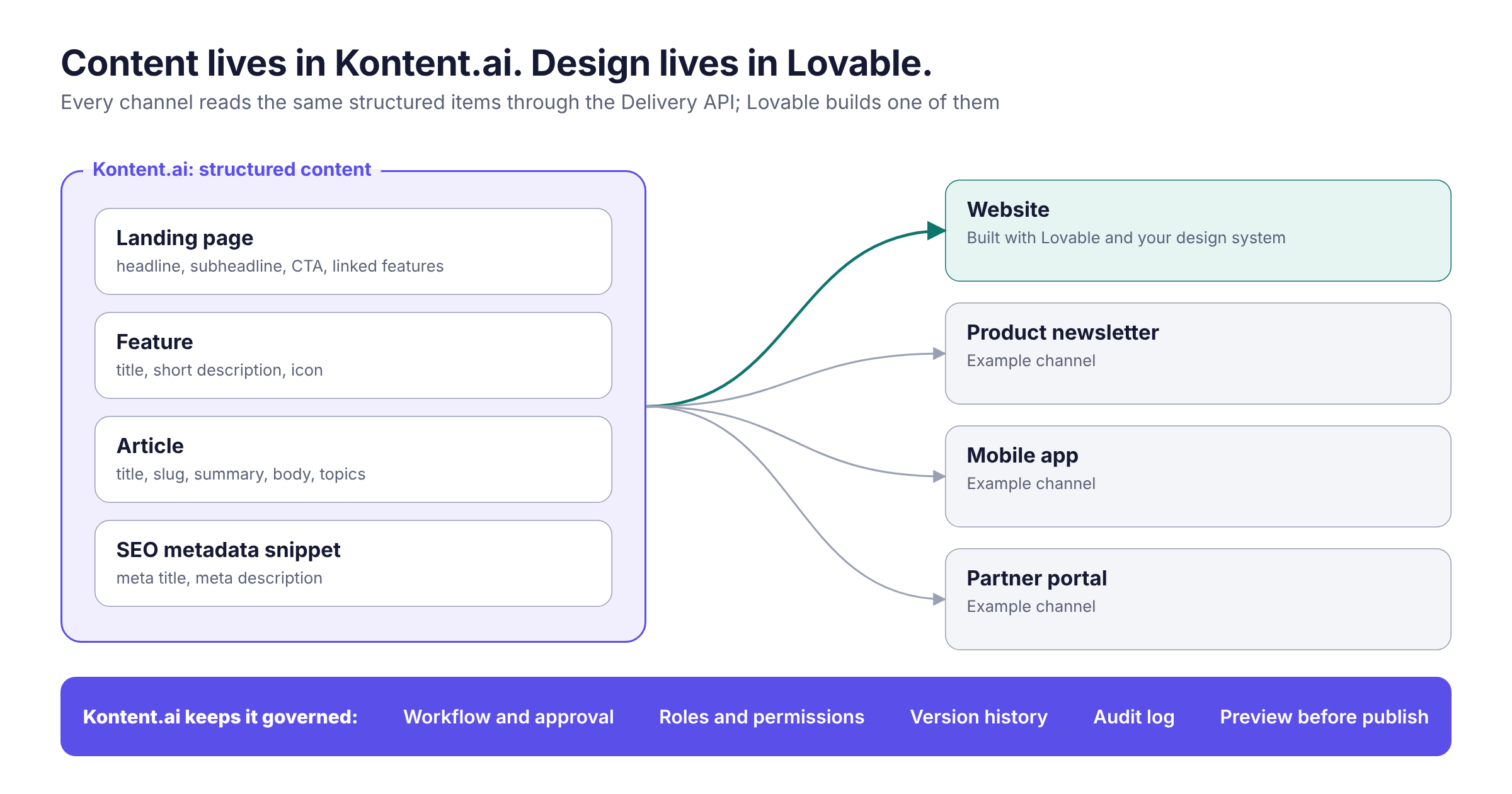
In this post, I'll show you how I went from a new Kontent.ai project to a live, on-brand marketing website without writing a line of code. Aiko, the built-in AI agent in Kontent.ai, did the content work, and Lovable built the website, connected through an Aiko custom connector. The content stays in Kontent.ai, structured and governed, and the website reads it from there.
Watch the full demo below:
Loading video...
Vibe-coded websites are fast to build, but hard to run
The rise of AI app builders is good news for marketers. Tools like Lovable turn a description into a working React website. For prototypes and one-off campaign pages, that's often enough.
The gap shows up the moment content has to live longer than the page. Your launch messaging also belongs in the product newsletter, the mobile app and a partner portal. Legal wants to approve claims before they go live. Your content team, not your developers, needs to update the headline next week when new keywords gain traffic. None of that works when the copy is part of the generated code.
That's exactly what a headless CMS solves. The question is how to keep the speed of an AI builder while the content stays where it belongs. Custom connectors in Aiko make it possible.
How it works, in five steps
For the demo I used a fictional brand, Northbeam, launching a real-time analytics product called Northbeam Pulse. The whole build comes down to five steps:
Connect Lovable to Aiko with a custom connector
Have Aiko design the content model
Let Aiko create and publish the content
Ask Aiko to brief Lovable to build the website
Connect the preview so editors can see changes before they publish
1. Connect Lovable to Aiko
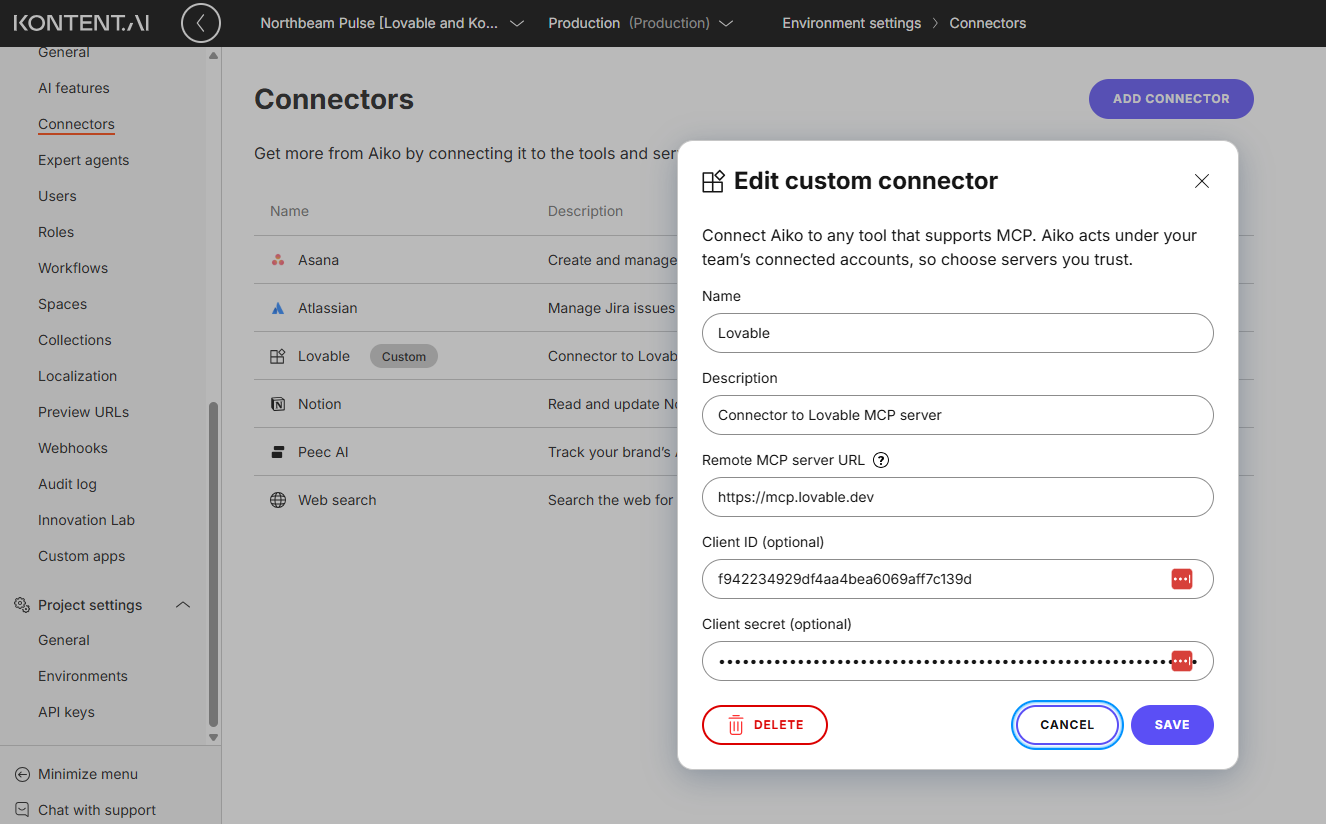
Aiko comes with predefined connectors, such as Asana, Atlassian and Notion, but you can add any tool that runs a remote MCP server as a custom connector. Lovable runs one at https://mcp.lovable.dev, and it uses OAuth, so every teammate signs in with their own Lovable account and Aiko acts under their permissions.
The setup takes two places:
In Lovable, a workspace owner or admin creates an OAuth client under Workspace settings > API keys & OAuth. Choose Web server as the application type and add https://app.kontent.ai/connectors/callback as the redirect URI. Select the scopes Aiko needs, register the client, and copy the Client ID and Client secret.
In Kontent.ai, a project manager goes to Environment settings > Connectors > Add connector, enters the server URL and pastes the Client ID and Client secret.
Then open Aiko, switch on the Lovable connector under the chat input, and approve the access. That's it.
Pro tip:
Lovable treats the project and workspace scopes as sensitive. They require a Lovable Business or Enterprise workspace, and users see an "unverified app" warning until Lovable verifies your OAuth client. Request verification in Lovable before you roll this out to your team.
2. Have Aiko design the content model
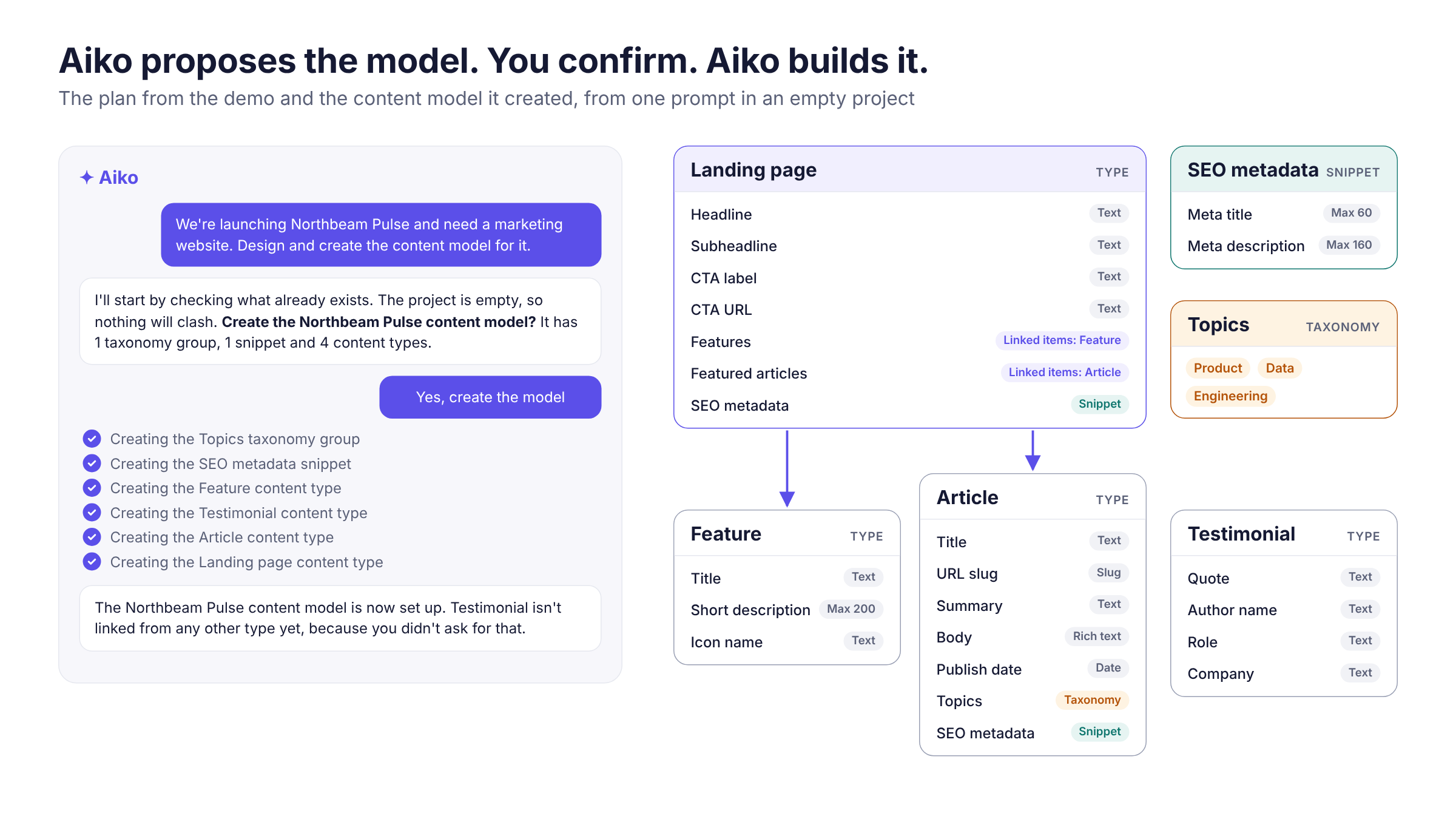
With the connector in place, I started with an empty project: no content types, no content. My first prompt described the launch site in plain English: a landing page, features, testimonials, articles, a reusable SEO snippet and a Topics taxonomy.
Aiko first checked what already existed, then asked me to confirm its plan before creating anything. After my confirmation it created the taxonomy group, the snippet and four content types, with element limits such as a 60-character meta title.
These are the same structured content types a content architect would build, ready for reuse on any channel instead of locked into one page. Every step Aiko takes is visible in the chat, so I could trace each change as it happened.
3. Let Aiko create and publish the content
The second prompt asked for the launch content: four features, two launch articles and a landing page that links them, in a plain, confident tone with all SEO fields filled in.
While Aiko works, you don't have to watch. Write something else, get a coffee, it keeps running. Aiko also works within your role: if you can't create landing pages yourself, Aiko can't either. Every change it makes is labeled "via Aiko" in the version history, so you always know what the AI touched.
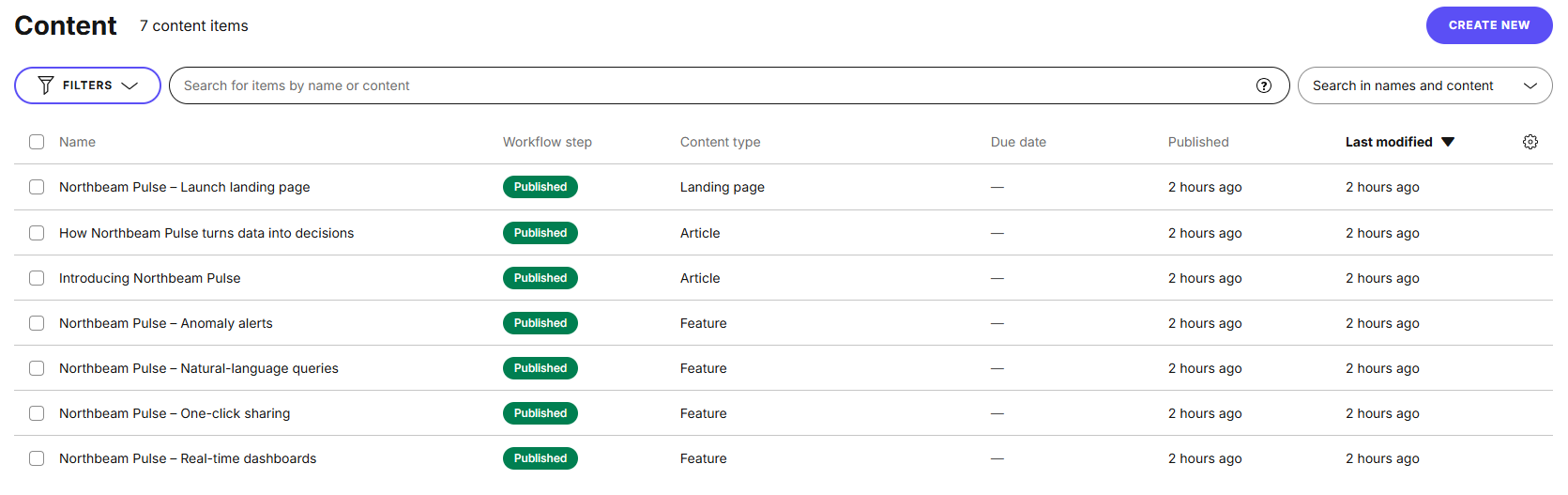
When the items were drafted, Aiko asked whether to publish them or keep them as drafts. I published them, and all seven items showed up in the content inventory.
4. Ask Aiko to brief Lovable
Normally, this is the moment you wait for a designer and a developer. Instead, I asked Aiko to brief Lovable through the connector.
Because Aiko knows the content model it just created, it writes the build brief itself: which content types exist, the exact codenames of every element, and where to fetch the content from. I asked to see the brief first, approved it, and Aiko sent it to the Lovable project.
Two things keep the result under control:
Brand: the Lovable project uses a Northbeam design system with the brand's colors, fonts and components. Lovable checks generated code against it, so the site stays on brand.
Content: the brief tells Lovable never to hardcode copy. Every text, link and SEO field comes from the Kontent.ai Delivery API at runtime.
The site has two modes. The live pages fetch published content. The preview pages fetch the latest drafts through the Delivery Preview API. That key unlocks unpublished content, so it never goes into a prompt or the browser: I stored it as a secret in Lovable, which only its server-side functions can read.
5. Connect the preview
When the build was ready, Aiko told me which preview URLs to use. Preview URLs are configured in Kontent.ai itself, under Environment settings > Preview URLs. I added the site's domain and a preview URL per content type, for example:
https://<your-site>/preview/articles/{URLslug}
Now editors open any item, click Preview, and see the draft on the real site. Because the site reads its content at runtime, it also works with live preview: change the headline in the editor and watch the page update next to it, before anything is published.
Why not let Lovable do everything?
It's a fair question. Lovable can generate a complete page on its own, so why involve a CMS at all? Because a website is one channel, and your content has to go further.
Reuse across channels. The same feature descriptions feed this site, your product newsletter, the mobile app and other websites. Create once, publish everywhere, without copy-pasting between tools.
Connected content. Change a feature once and every page that links to it updates.
Workflow and approval. AI can draft, but your workflow decides what goes live. Limit the step before publishing to your brand or legal reviewers, and nothing ships without them.
Governance and traceability. Aiko works within each user's permissions, and every change, by a person or by Aiko, is in the version history and the audit log.
Editors stay in control. Your content team changes a headline, previews it and publishes it. No developer, no redeploy.
Lovable gives you speed. Kontent.ai keeps that speed structured, governed and reusable.
Speed and structure, together
With a custom connector, Aiko becomes the place where content and the tools around it meet. In one conversation I went from an empty project to a content model, published content, an on-brand website and a working preview. The website is fast to build, and the content behind it is ready for every other channel you'll need.
Lovable is just one example. Any tool with a remote MCP server that supports OAuth can become an Aiko custom connector. What will you connect first?
What if we told you there was a way to make your website a place that will always be relevant, no matter the season or the year? Two words—evergreen content. What does evergreen mean in marketing, and how do you make evergreen content? Let’s dive into it.
How can you create a cohesive experience for customers no matter what channel they’re on or what device they’re using? The answer is going omnichannel.
To structure a blog post, start with a strong headline, write a clear introduction, and break content into short paragraphs. Use descriptive subheadings, add visuals, and format for easy scanning. Don’t forget about linking and filling out the metadata. Want to go into more detail? Dive into this blog.
Lucie Simonova
Subscribe to the Kontent.ai newsletter
Get the hottest updates while they’re fresh! For more industry insights, follow our LinkedIn profile.