How to Personalize a Next.js Site Without Duplicating Pages
Personalize a Next.js site using location, date, and weather, with no visitor profiles. Tag content once in Kontent.ai, and keep the rules out of your code.
Your new site went live last week, and the marketing department is already asking: When can we personalize it for our target markets?
Typically, that means developers start creating variants: one per country, one per sales region, one for every campaign. Before long, a single offer has dozens of versions to write, tag, and keep up to date, and the project quietly ends up in the backlog.
There's a simpler way to start: personalize on the context every request already carries (location, date, time, and weather), with no login, no cookies, and no tracking profile. We built a demo site for a fictional travel agency to show how it works, from the content model to the code.
Meet the demo
Wanderlane Travel is our demo site, built with Next.js and Kontent.ai. Because it's a travel agency, its rules use season and weather, but the same pattern works for any context the site can read: country for regional offers, or date for campaigns and launches.
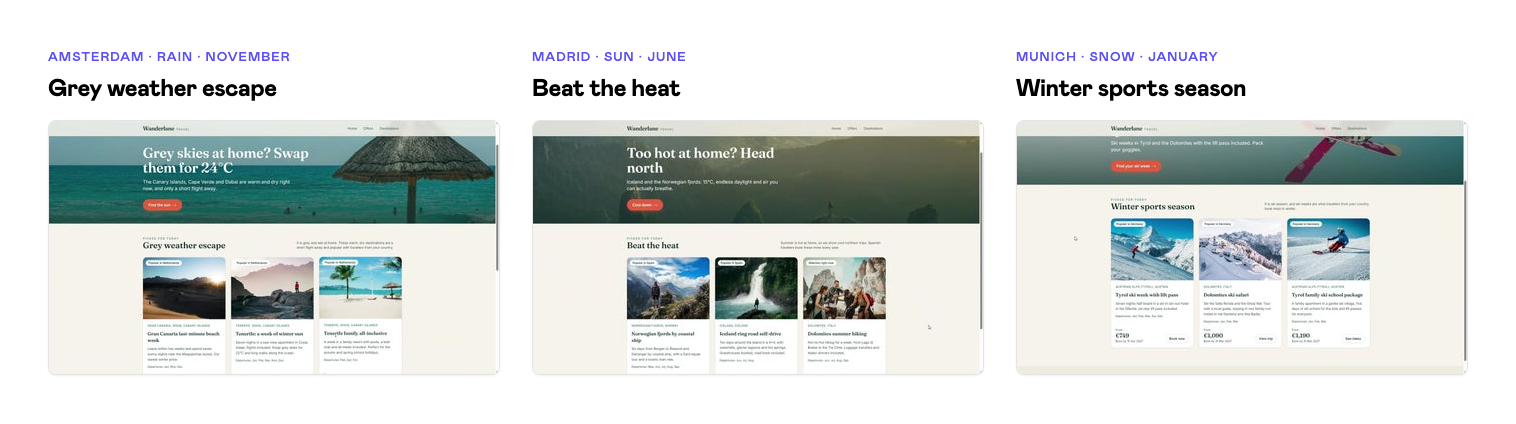
Before we look under the hood, open the demo and see what a visitor sees. Each demo URL fixes the context, so you get the same result wherever you are:
Scroll horizontally to see more →
Visiting from
Demo URL
What the page leads with
Amsterdam, rain, November
/demo/amsterdam-rain-november
"Grey skies at home? Swap them for 24°C": winter sun on the Canary Islands, Cape Verde and Dubai
Madrid, sun, June
/demo/madrid-sun-june
"Too hot at home? Head north": Iceland, the Norwegian fjords and the Dolomites
Munich, snow, January
/demo/munich-snow-january
Winter sports season: ski weeks in Tyrol and the Dolomites
Wherever you are right now
/?debug=1
Whatever matches your own location, date and weather, plus the "Why am I seeing this?" panel
All three pages come from the same content in Kontent.ai. Nobody wrote an "Amsterdam version" of the homepage. The offers and hero banners are written once and tagged, and the site picks the right ones for the context. Let's see how.
The same tagged content in Kontent.ai, three different homepages
Prefer to watch? This 4-minute video shows the whole flow, from the demo site to the Expert Agent and Aiko.
Personalize your website without building different versions of one page
How the site picks what each visitor sees
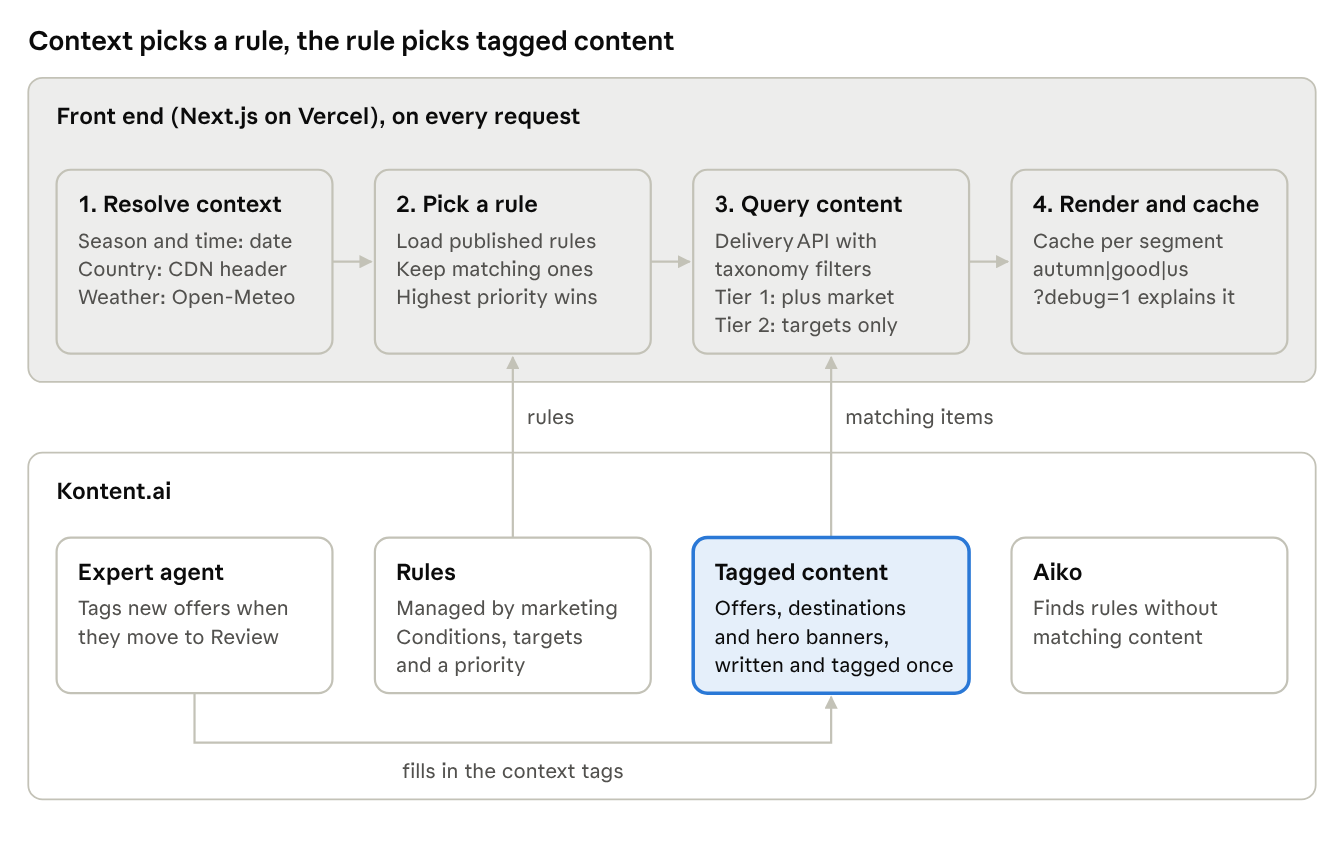
The idea fits in one sentence: the context picks a rule, and the rule picks tagged content. Everything that changes over time (the content, its tags and the rules) lives in Kontent.ai. The front end only reads the context and asks the Delivery API for matching content.
How to build it step by step
1. Describe the context with taxonomies
Personalization starts with a shared vocabulary. In Kontent.ai, we created five taxonomy groups that describe when and for whom content is relevant:
Scroll horizontally to see more →
Taxonomy group
Terms
Season
Winter, Spring, Summer, Autumn
Climate
Sunny and warm, Snow, Mild, Tropical
Weather fit
Good for a bad-weather escape, Good in any weather
Source market
Netherlands, Germany, Belgium, United Kingdom, France, Spain
Trip type
Beach, City, Ski, Adventure, Culture, Family
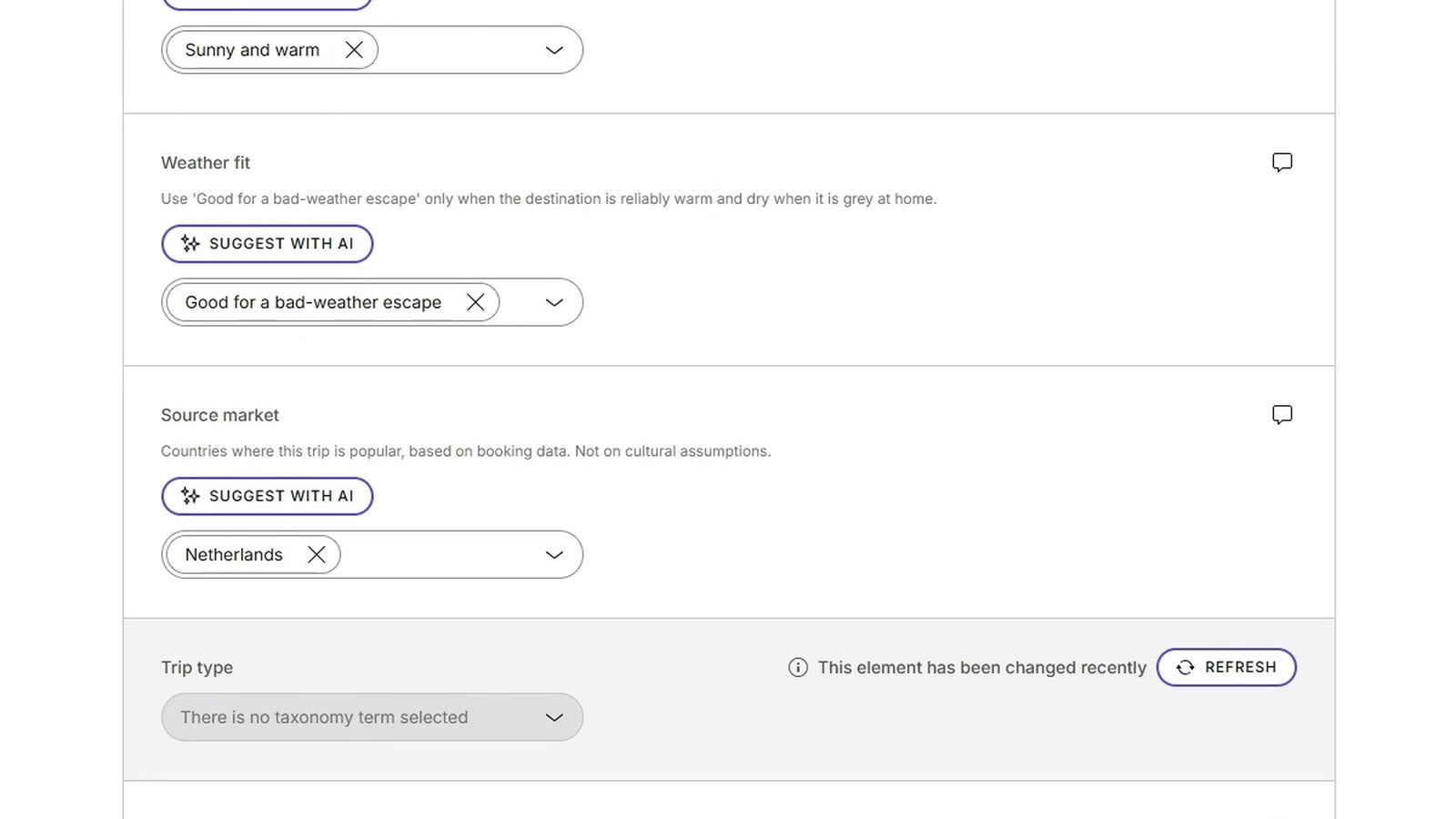
We added the five taxonomy elements to a content type snippet called "context tags", and used that snippet in the Destination, Offer and Hero banner content types. Each element gets a short guideline, so editors know what a term means. For example, Source market says: "Countries where this trip is popular, based on booking data. Not on cultural assumptions."
One tip: keep the vocabulary fixed. Only roles with the "manage taxonomy" permission can add or change terms, so if your editors don't have it, everyone tags with the same words, and your front end can rely on them.
2. Tag your content once
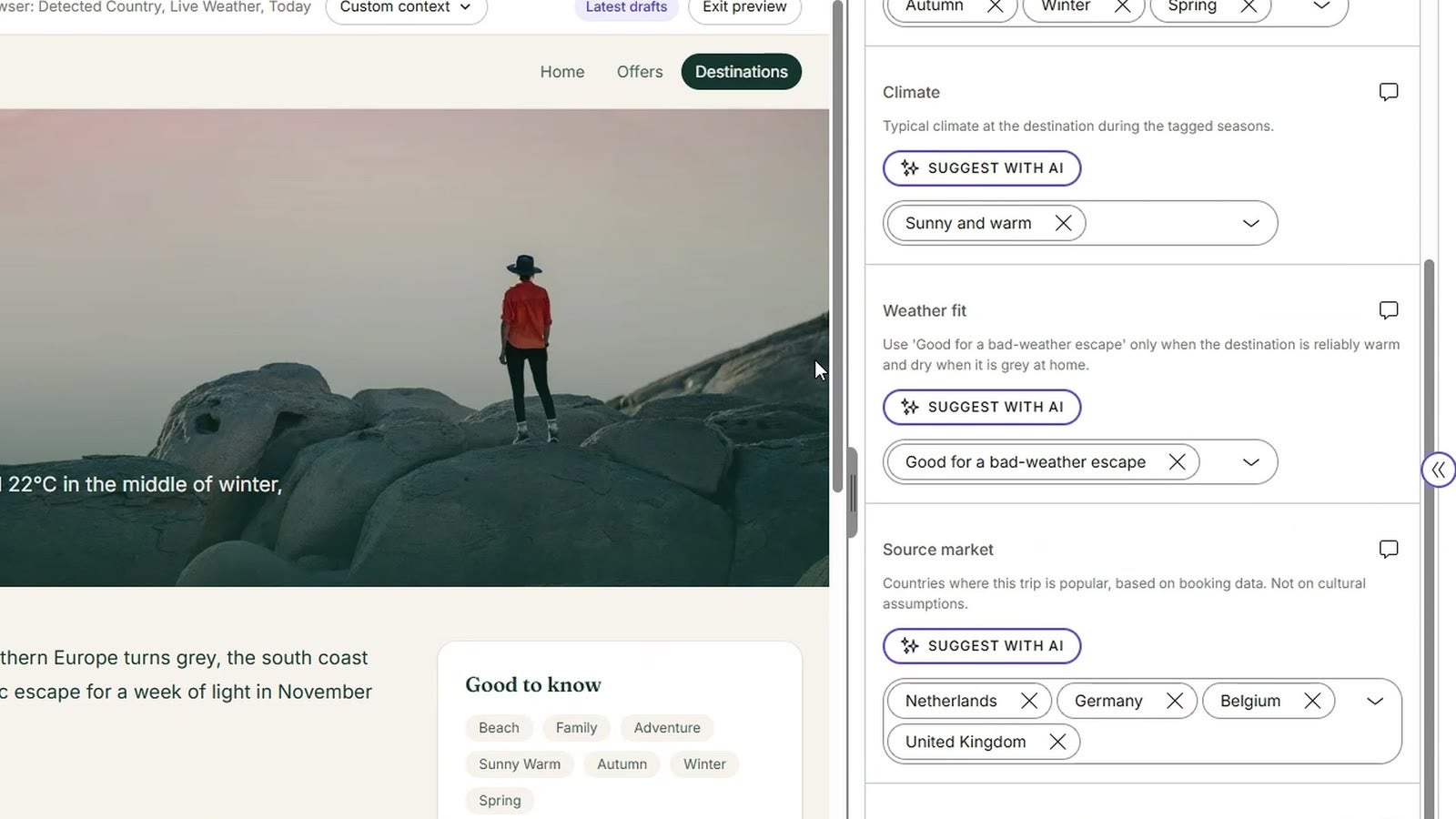
Now every destination, offer, and hero banner gets its context tags. Here's Tenerife: autumn, winter and spring; sunny and warm; good for a bad-weather escape; popular in the Netherlands, Germany, Belgium and the UK.
Tenerife, written once and tagged for when and for whom it's relevant.
This is where the duplicate versions disappear. You don't write a Dutch, a winter and a rainy-day version of Tenerife. You write one destination and describe where it fits. For hand tagging, the Suggest with AI button on each taxonomy element proposes terms based on the item's text.
3. Let an Expert Agent do the tagging
Tagging by hand works for twenty items. With hundreds of offers, it becomes the next bottleneck. That's where Expert Agents come in: AI agents in Kontent.ai that run in the background whenever specific content changes occur.
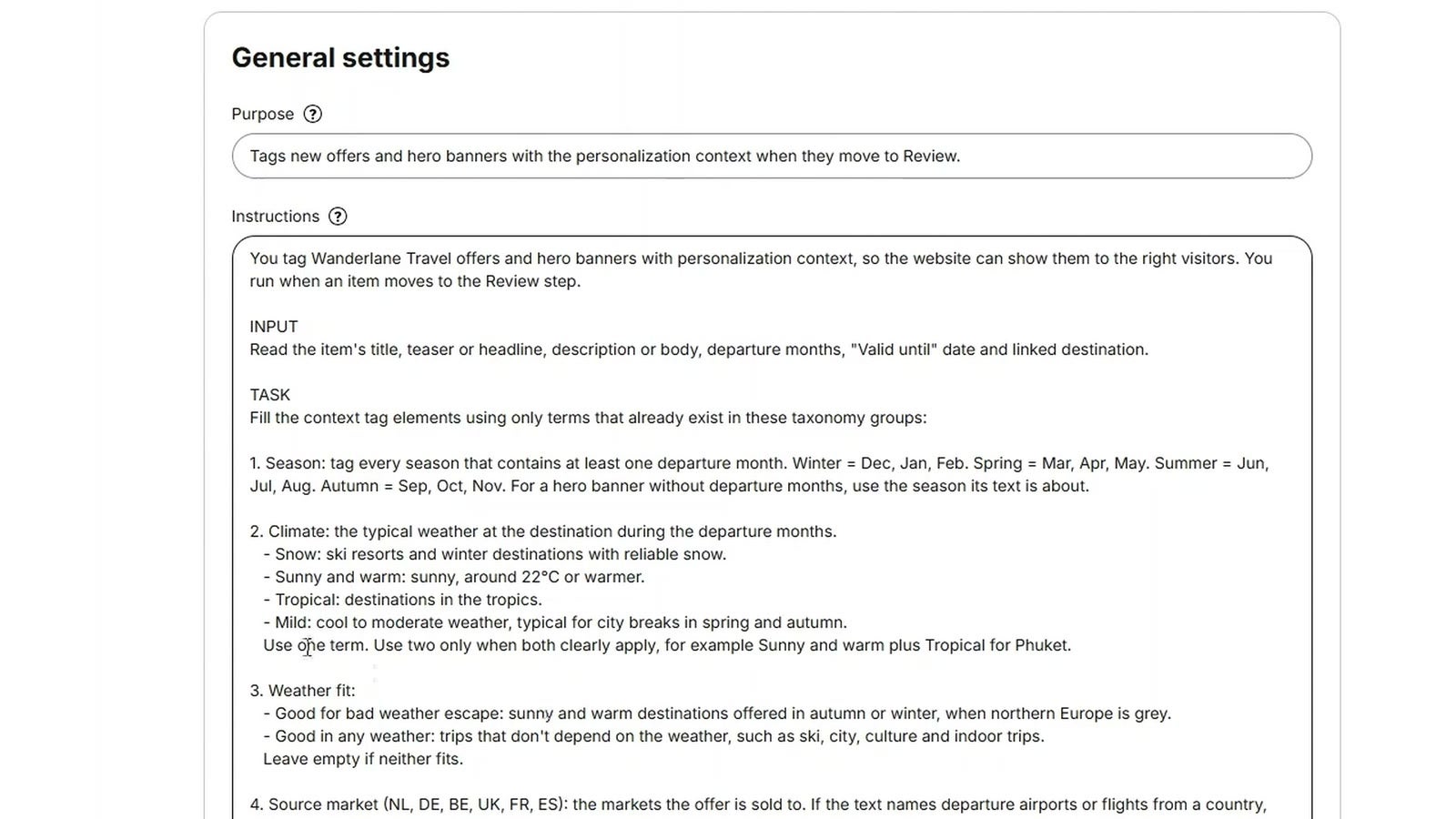
We created an agent called Personalization tagger in Environment settings > Expert agents:
Scroll horizontally to see more →
Setting
Value
Event
Workflow step changed to: Review
Filters
Content types Offer and Hero banner
Task complexity
Balanced
Permissions
Update content items
The instructions describe each taxonomy group and when to use which term. A short excerpt:
2. Climate: the typical weather at the destination during the departure months.
  - Snow: ski resorts and winter destinations with reliable snow.
  - Sunny and warm: sunny, around 22°C or warmer.
  - Tropical: destinations in the tropics.
  - Mild: cool to moderate weather, typical for city breaks in spring and autumn.

RULES
- Only change the context tag elements. Don't edit text, prices or any other element.
- Keep tags an editor already set. Only fill groups that are empty.
- If the content doesn't give enough information for a group, leave it empty rather than guess.
- Don't change the workflow step, and don't publish or unpublish anything.
The Personalization tagger agent and its instructions.
The rules matter as much as the definitions. Expert Agents can't ask follow-up questions, so the instructions need to be complete, and they need to say what the agent must not touch. Before switching the automation on, test your instructions with Aiko on a few items.
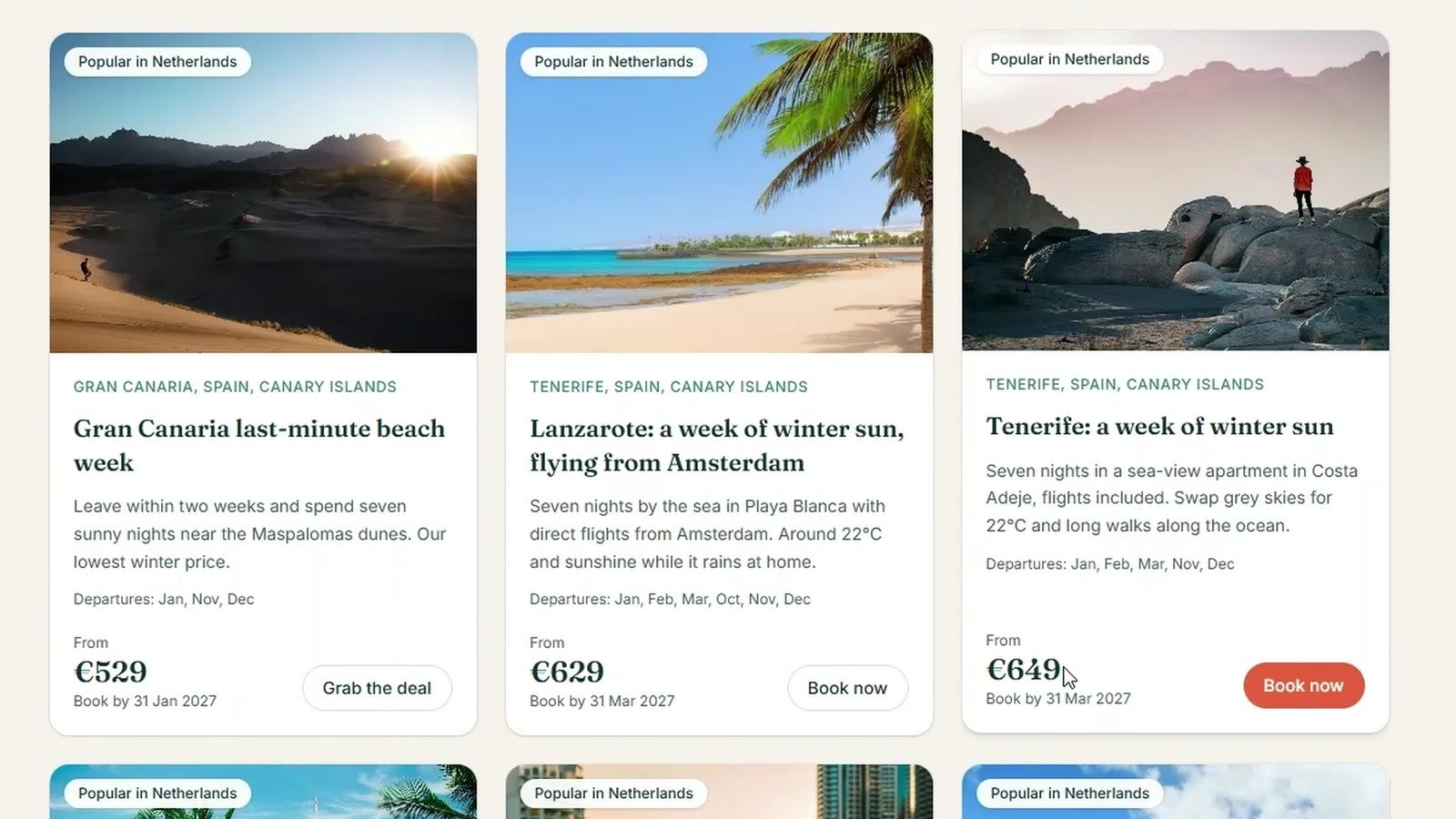
To see it in action, We created a new offer, "Lanzarote: a week of winter sun, flying from Amsterdam", and left all the context tags empty. When we moved it to Review, the agent read the offer and filled in the tags: the seasons from the departure months, sunny and warm, good for a bad-weather escape, the Netherlands (because the flights leave from Amsterdam) and beach.
The Lanzarote offer after the agent ran: every tag filled in, every change labeled with the agent's name in the version history.
Every change the agent makes shows up in the item's version history and the audit log under the agent's name, so you can always see who changed what. We checked the tags and published the offer.
4. Move the rules out of your code
Tags describe the content. Rules decide which content fits a context. We didn't want those rules hidden in code, because then every campaign change becomes a developer ticket. So the rules are content items too, of a Personalization rule content type:
Conditions: seasons, weather (good or bad) and visitor countries. An empty condition means "any".
Targets: the context tags that content must have to match.
Priority: which rule wins when more than one matches.
Explanation: one sentence on why the rule exists, shown in the debug panel.
The demo has six rules, such as Winter sports season (priority 90), Beat the heat (priority 70) and City break season (priority 50). City break season, for example, applies in spring and autumn when the weather is good, in any country, and targets city and culture trips: "Mild weather and smaller crowds make spring and autumn the best time for a city break."
5. Resolve the context in the front end
On every request, the site works out the context: season and time from the date, country and location from the request, and the weather from a weather API. On Vercel, the country and coordinates come in as request headers, and Open-Meteo provides current weather without an API key. A simplified version:
export async function resolveContext(headers: Headers, now = new Date()): Promise<Context> { const country = (headers.get("x-vercel-ip-country") ?? "NL").toLowerCase(); const lat = headers.get("x-vercel-ip-latitude") ?? "52.37"; const lon = headers.get("x-vercel-ip-longitude") ?? "4.89";
const res = await fetch( `https://api.open-meteo.com/v1/forecast?latitude=${lat}&longitude=${lon}¤t=weather_code,temperature_2m`, { next: { revalidate: 900 } } // the weather doesn't change every second ); const { current } = await res.json();
// WMO weather codes: 0 to 3 is clear or cloudy, 45 and up is fog, rain, snow or thunder const weather = current.weather_code >= 45 ? "bad" : "good";
return { season: seasonFor(now.getMonth() + 1), weather, country }; }
The demo URLs simply skip this step and use a fixed context from a small config file. That's also handy for testing: you can check every scenario without waiting for rain.
6. Pick a rule and ask Kontent.ai for matching content
With the context known, the site loads the published rules, keeps the ones whose conditions match, and takes the one with the highest priority. Its targets become taxonomy filters on the Delivery API. Within one taxonomy group, an offer needs at least one of the target terms ([any]); across groups, it needs all of them.
First, the rule. Map each published Personalization rule item from the Delivery API to a small object, then keep the rules whose conditions fit the context:
// lib/rules.ts (simplified) export type Rule = { name: string; priority: number; seasons: string[]; // empty means any season weather: string[]; // empty means any weather countries: string[]; // empty means any country targets: Record<string, string[]>; // for example { season: ["spring", "autumn"], trip_type: ["city", "culture"] } };
// A fresh query with the rule's targets: [any] within a group, all groups combined function ruleQuery(rule: Rule) { let query = client.items().type("offer"); for (const [group, terms] of Object.entries(rule.targets)) { if (terms.length) query = query.anyFilter(`elements.context_tags__${group}`, terms); } return query; }
export async function offersFor(rule: Rule, ctx: Context) { // Tier 1: the rule's targets, and popular in the visitor's market const local = await ruleQuery(rule) .anyFilter("elements.context_tags__source_market", [ctx.country]) .toPromise(); if (local.data.items.length) return local.data.items;
// Tier 2: the rule's targets only const broad = await ruleQuery(rule).toPromise(); return broad.data.items; // empty? the page falls back to its default content }
For a visitor in autumn with good weather, City break season wins, and the request to the Delivery API looks like this:
The tiers keep the page from ever going empty. If no offer is tagged for the visitor's market, the site drops that filter. If the rule matches nothing at all, the visitor gets the default homepage, which is exactly what they'd have seen without personalization.
7. Cache per segment, not per visitor
This looks like it would make every page view a unique render, but it doesn't. The context collapses into a short segment key, such as autumn|good|us. With four seasons, two kinds of weather and a handful of countries, there are only a few dozen segments, so you can cache each one and serve it as fast as any static page. Give the cache a short lifetime, for example a minute, so newly published content shows up quickly.
8. Make it explainable
Personalization that nobody can explain is hard to trust, for editors and developers alike. Add ?debug=1 to any URL in the demo, and a "Why am I seeing this?" panel shows the detected context, the segment, the rule that fired and the exact Delivery API filter:
Context   2026-11-17 (autumn) · country US · weather good, clear sky, 2°C · Columbus
Segment   autumn|good|us
Rule      City break season (priority 50), managed in Kontent.ai
         Spring or autumn, good weather, any country
         "Mild weather and smaller crowds make spring and autumn the best time for a city break."
Filter    Tier 2, rule targets only, 4 results
         /items?system.type=offer&elements.context_tags__season[any]=spring,autumn
                &elements.context_tags__trip_type[any]=city,culture
No booking data exists for the US market, so the site skipped tier 1 and showed the rule's targets without the market filter.
And here's the Lanzarote offer from step 3, live on the page for a visitor from Amsterdam on a rainy November evening. Nobody touched the code: an editor wrote it, an agent tagged it, and a rule picked it.
The new Lanzarote offer on the Amsterdam homepage, a few minutes after it was published.
Find the gaps with our AI agent Aiko
Once the rules are live, a new question comes up: which visitors are we still missing? A rule without matching content quietly falls back to the default page, and nobody notices unless someone tests every combination.
That check is a good job for Aiko, the general AI agent built into Kontent.ai, and it's one you can hand to your content team. You describe a task in plain language, and Aiko works through your content within your roles and permissions. We asked:
Where are we missing content for our visitors?
For each personalization rule and each source market, check whether at least one published offer is tagged for that market and matches the rule the way our website does: at least one tag from each of the rule's taxonomy groups. Skip expired offers.
Show only the gaps, in a short table. Then tell me which gap to fill first, based on rule priority, and suggest one offer to close it.
Don't change any content.
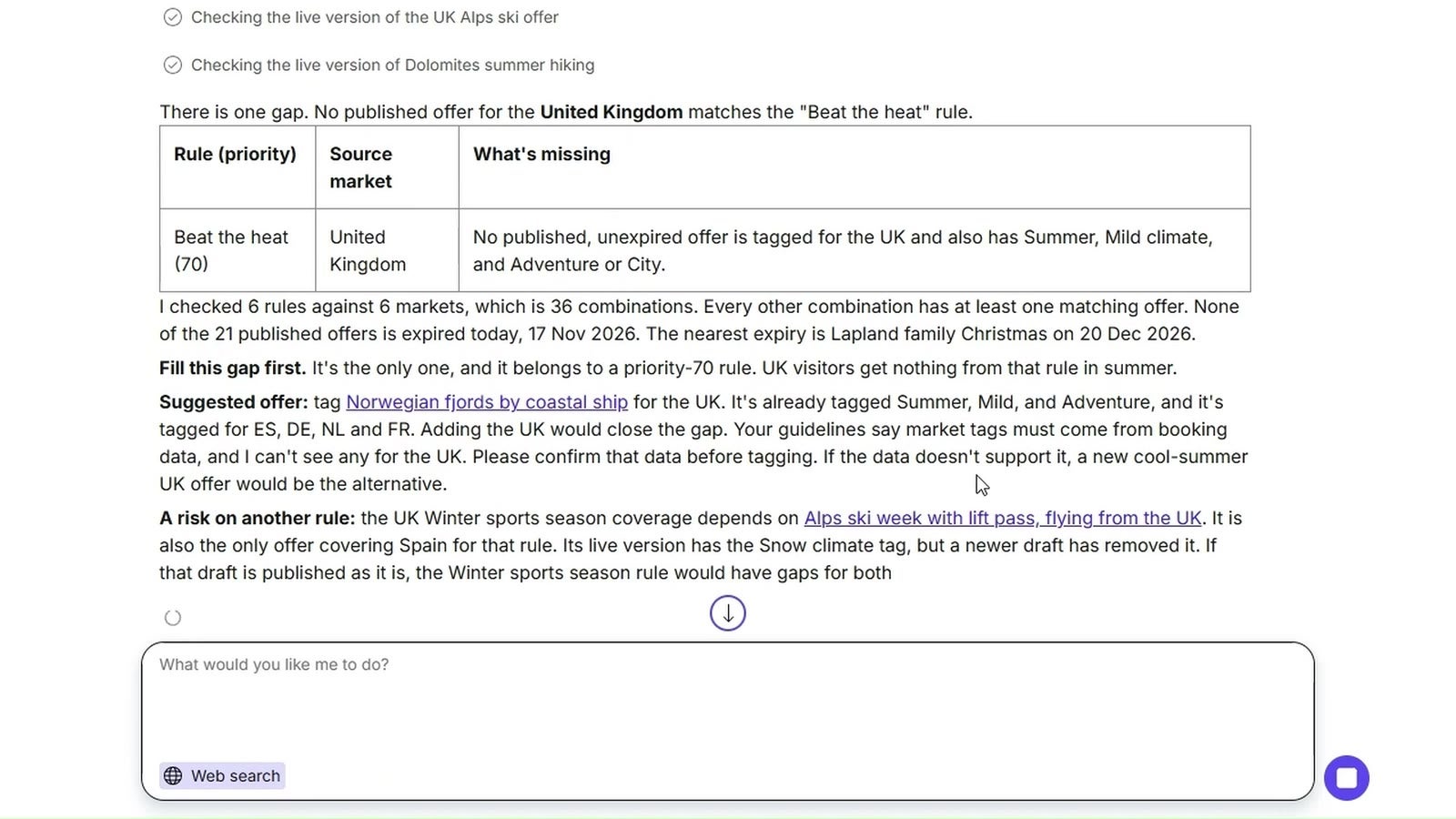
The middle sentence is the important one. My first attempt didn't say how the website matches tags, so Aiko required every target tag at once and reported 23 gaps, most of them not real. Once the prompt described the [any] logic, Aiko checked 6 rules against 6 markets (36 combinations) and found exactly one gap: no offer matches the Beat the heat rule for visitors from the United Kingdom. It even suggested a fix: offer the existing Norwegian fjords trip in the UK, if the booking data supports it.
Aiko's coverage check: one gap out of 36 combinations, and a suggestion to close it.
The last line of the prompt matters too. Aiko can make changes for you, but for an analysis like this, you want a report first and a decision from a person.
Taking it further: CDPs, personalization platforms and more
Context is a great place to start because it needs no visitor data. But it only knows where and when someone visits, not who they are. Once you're ready for more, the good news is that the foundation stays the same: content tagged once in Kontent.ai, and something that decides which tags fit a visitor. What changes is who makes that decision and what data it uses.
Scroll horizontally to see more →
Approach
What decides
Data it needs
Good fit when
Context rules (this demo)
Your front end, with rules managed in Kontent.ai
Location, date, time, weather
You want to start quickly, without consent banners or visitor profiles
Context rules plus CDP segments
Your front end, with segments from your CDP
Consented first-party data: interests, past bookings, lifecycle stage
You already run a CDP and want returning visitors to see more relevant content
Personalization platform or DXP
The platform's rules, intents and tests
Behavior during the visit, plus data you connect
Marketing wants visual composition, A/B tests and intent tracking in one tool
Recommendation engine
A machine-learning model
Clicks, views and bookings
You have a large catalog and want "you might also like" per visitor
Add segments from a CDP
A customer data platform already knows things about returning visitors: which trips they looked at, whether they travel with kids, which newsletter they opened. The simplest way to use that is to treat a segment as one more piece of context.
Add an Audience segment taxonomy group to the Context tags snippet, with terms that match your CDP segments, for example Family traveller or Adventure seeker.
In the front end, or better at the edge, look up the visitor's segments from your CDP for the current anonymous or known ID, but only with the visitor's consent.
Add segments as a condition to your personalization rules, next to season, weather and country.
Add the segment to the cache key, and keep the number of segments small, so caching still works.
The content model barely changes, and editors keep tagging in the same place. If you use expert agents, add the new group to the agent's instructions, and new content gets tagged for it automatically.
Connect a personalization platform or CDP
Every content item, tag and rule in this article comes through Kontent.ai's APIs. Whatever decides who sees what reads the same tagged content your front end reads, so the personalization, CDP and marketing platforms you already use connect to it the same way:
Personalization platforms and DXPs add A/B testing, intent scoring during a visit and visual page composition. They match on the same tags and decide which content each visitor sees.
Recommendation engines learn from clicks, views and bookings, and pick the most relevant items for each visitor from the content you publish.
CDPs and marketing automation tools supply segments and profile data, as described above, and can reuse the same content in emails and campaigns.
In every case, the work from this article carries over. Well-tagged content is what these tools match on, and expert agents keep the tagging consistent however much content you add.
Choose where the logic runs
On the server or at the edge, as in this demo: the page is personalized before it reaches the browser, so there's no flicker, and caching per segment keeps it fast.
In the browser: the page loads the default content first and swaps in personalized blocks. This works on fully static sites and with client-side tools, at the cost of a short flash of default content.
In the platform: the platform's SDK or API decides which content to show, and your front end renders it.
Whichever direction you choose, start small. One or two rules that visibly change the homepage teach you more about your audience than a personalization roadmap that never leaves the backlog.
Where to start
Personalization doesn't have to start with a version of every page for every audience. Describe your content once with a small, fixed set of context tags, let an Expert Agent keep the tagging consistent, and keep the rules in Kontent.ai, where marketing changes them without a developer ticket. The front end then only reads the context, picks a rule and asks Kontent.ai for matching content. When you're ready for visitor data or a personalization platform, the same tagged content is your foundation.
Open the Amsterdam, Madrid and Munich demos side by side, or add ?debug=1 to see why you get what you get. When your team is ready to see how this fits your own content model, talk to an expert.
Subscribe to the Kontent.ai newsletter
Get the hottest updates while they’re fresh! For more industry insights, follow our LinkedIn profile.